A shopper adds your Black Friday deal to their cart, reaches checkout, and leaves. You see the abandoned order, but not the reason behind it. Was shipping too expensive? Did the coupon fail? Or were they still comparing prices?
Black Friday cart abandonment happens when someone adds a product to their cart but leaves without completing the purchase. Across 50 studies, Baymard Institute puts the average ecommerce cart abandonment rate at 70.22%. That is roughly seven in ten carts, although the figure is not specific to Black Friday.
During a busy sale, even a familiar checkout problem can affect more shoppers. A shipping charge that surprises ten customers on a normal day could surprise many more when your campaign brings extra traffic.
Black Friday 2026 falls on November 27. Below are ten common reasons shoppers leave, how those problems can affect your sale, and what you can do before launch.
Why Do Shoppers Abandon Carts on Black Friday?
Shoppers abandon carts because of unexpected costs, failed discounts, slow delivery, account requirements, complicated checkout forms, payment problems, and concerns about the store. Others are simply comparing deals and are not ready to buy.
Some of these problems are within your control. Others reflect how people shop. The useful first step is to separate checkout obstacles from shoppers who were only browsing.
Is Cart Abandonment Higher on Black Friday?
Not necessarily. More traffic does not automatically mean a higher abandonment rate.
One dataset reported by eCommerceNews recorded 70.91% abandonment on Black Friday, compared with 71.65% on an average day. That is one reported comparison, rather than a universal benchmark.
Your store may see a different pattern depending on its products, traffic sources, devices, and offers.
Consider a simple example. A store normally creates 200 carts a day. At 70% abandonment, 140 are left without a purchase. If the number of carts doubles during Black Friday and abandonment stays at 70%, that becomes 280 abandoned carts.
The rate has not changed, but more shoppers have left. This does not mean every abandoned cart was recoverable revenue; some shoppers were never ready to purchase.
Black Friday Cart Abandonment Reasons at a Glance
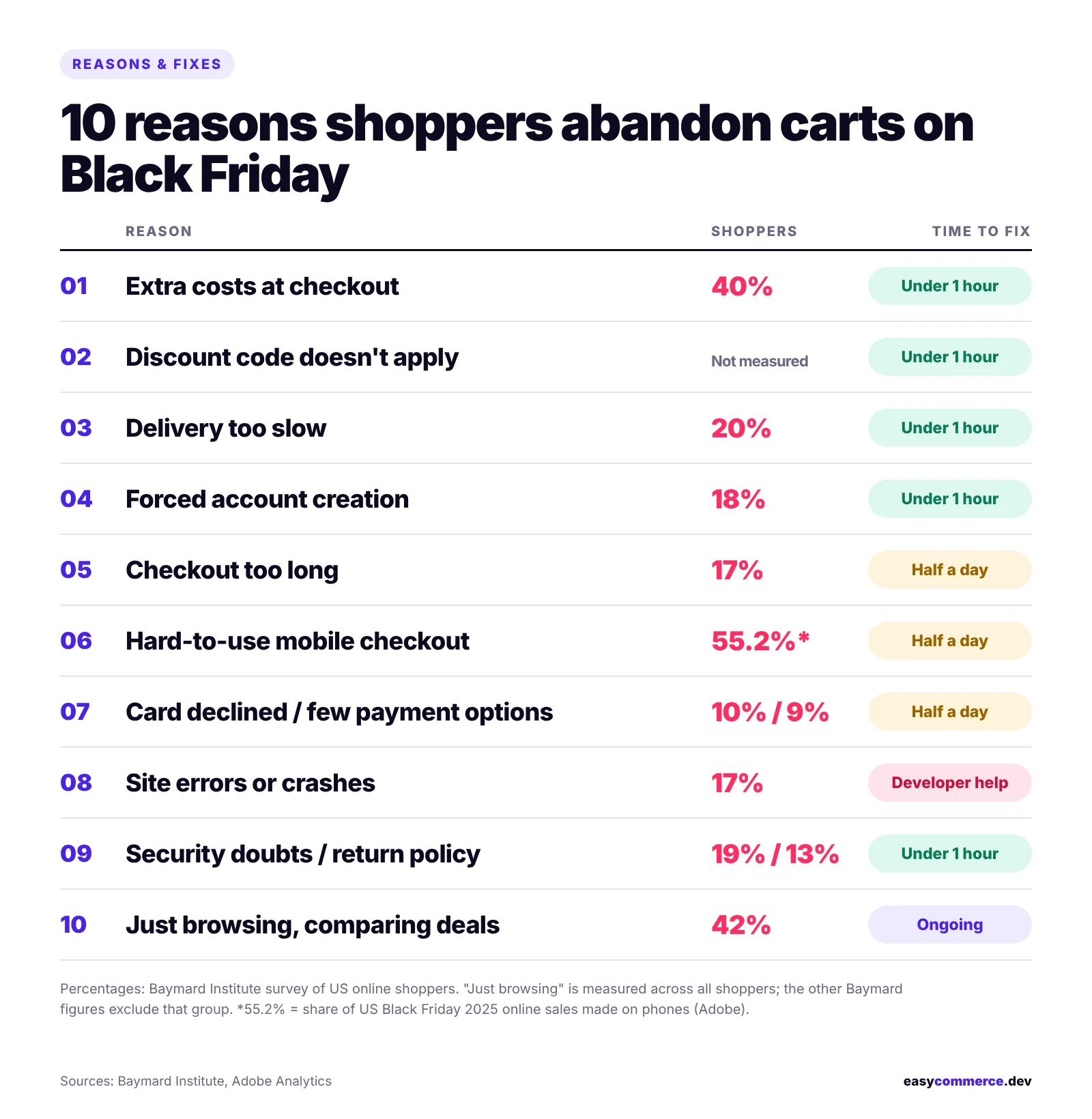
Use this table to choose what to check first. The research figures describe general ecommerce behavior, not Black Friday-only abandonment.
The time estimates are planning guides. Updating a message can be quick; changing fulfilment, payment systems, or checkout functionality may take longer.
| # | Reason | Supporting research | Why it matters on Black Friday | Estimated time to address |
| 1 | Extra costs at checkout | 40% cited high extra costs | Shoppers compare final prices | Under an hour for clearer messaging |
| 2 | Discount does not apply | No comparable figure cited | The checkout contradicts the advertised offer | Under an hour for basic checks |
| 3 | Delivery too slow | 20% cited slow delivery | Gift purchases may have deadlines | Under an hour to clarify estimates |
| 4 | Forced account creation | 18% cited account requirements | New customers may not want an account | Under an hour if a setting exists |
| 5 | Checkout too long | 17% cited a complicated checkout | Unnecessary fields add effort | Half a day or more |
| 6 | Hard-to-use mobile checkout | Mobile generated 55.2% of US Black Friday 2025 online sales | Many purchases happen on phones | Half a day or more |
| 7 | Payment problems | 10% cited declines; 9% cited limited methods | Customers need a working way to pay | Half a day or more |
| 8 | Site errors or crashes | 17% cited errors or crashes | Higher traffic can expose capacity problems | May need developer help |
| 9 | Trust and return concerns | 19% cited payment trust; 13% cited returns | Unfamiliar stores need to establish confidence | Under an hour for clearer information |
| 10 | Just browsing | 42% reported browsing or not being ready | Shoppers may save products while comparing deals | Ongoing |
The abandonment reasons come from Baymard’s research. The browsing figure is reported separately from the other reasons, so the percentages should not be added together. The mobile sales figure comes from Adobe’s 2025 holiday recap.
Part 1: Unexpected Costs, Failed Discounts, and Slow Delivery
A discount attracts attention, but shoppers still judge the final cost and delivery terms. An offer can lose its appeal when checkout reveals something they did not expect.
1. Shipping, Taxes, and Fees Show Up Too Late
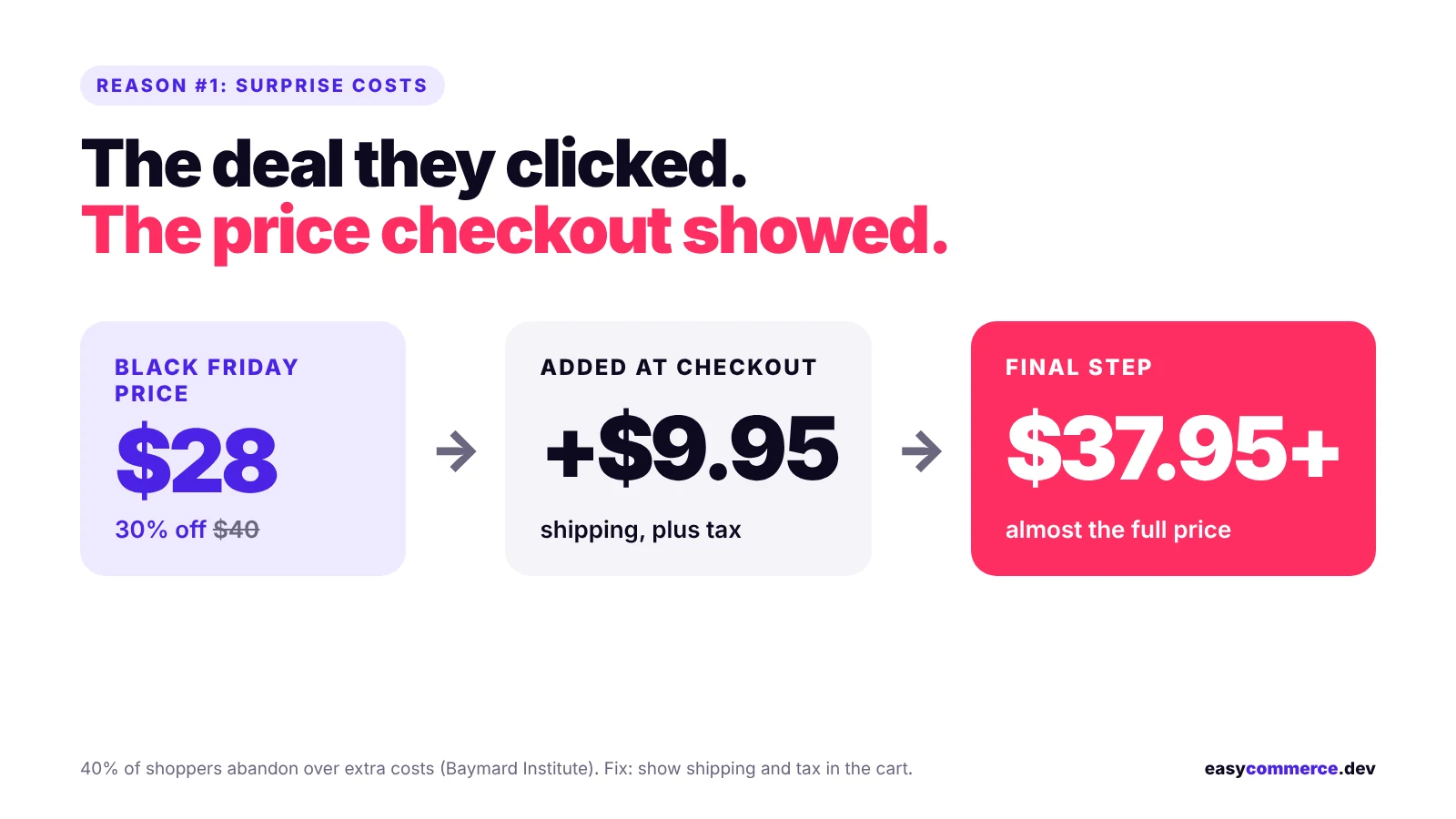
Baymard found that 40% of respondents in its non-browsing breakdown cited extra costs that were too high.
That finding concerns the amount charged. Revealing those charges late adds another problem: shoppers cannot evaluate the full offer until they have already spent time checking out.
Imagine a $40 hoodie discounted to $28. Add $9.95 shipping, and the total reaches $37.95 before tax. A shopper comparing stores may decide the saving is no longer worthwhile.
The fix: Show shipping information and estimated taxes as early as you reasonably can. If the final amount depends on location, explain that and let shoppers enter their destination before the payment step.
Display any free-shipping threshold clearly. In EasyCommerce, configure your shipping and tax rules, then test totals using representative customer addresses.
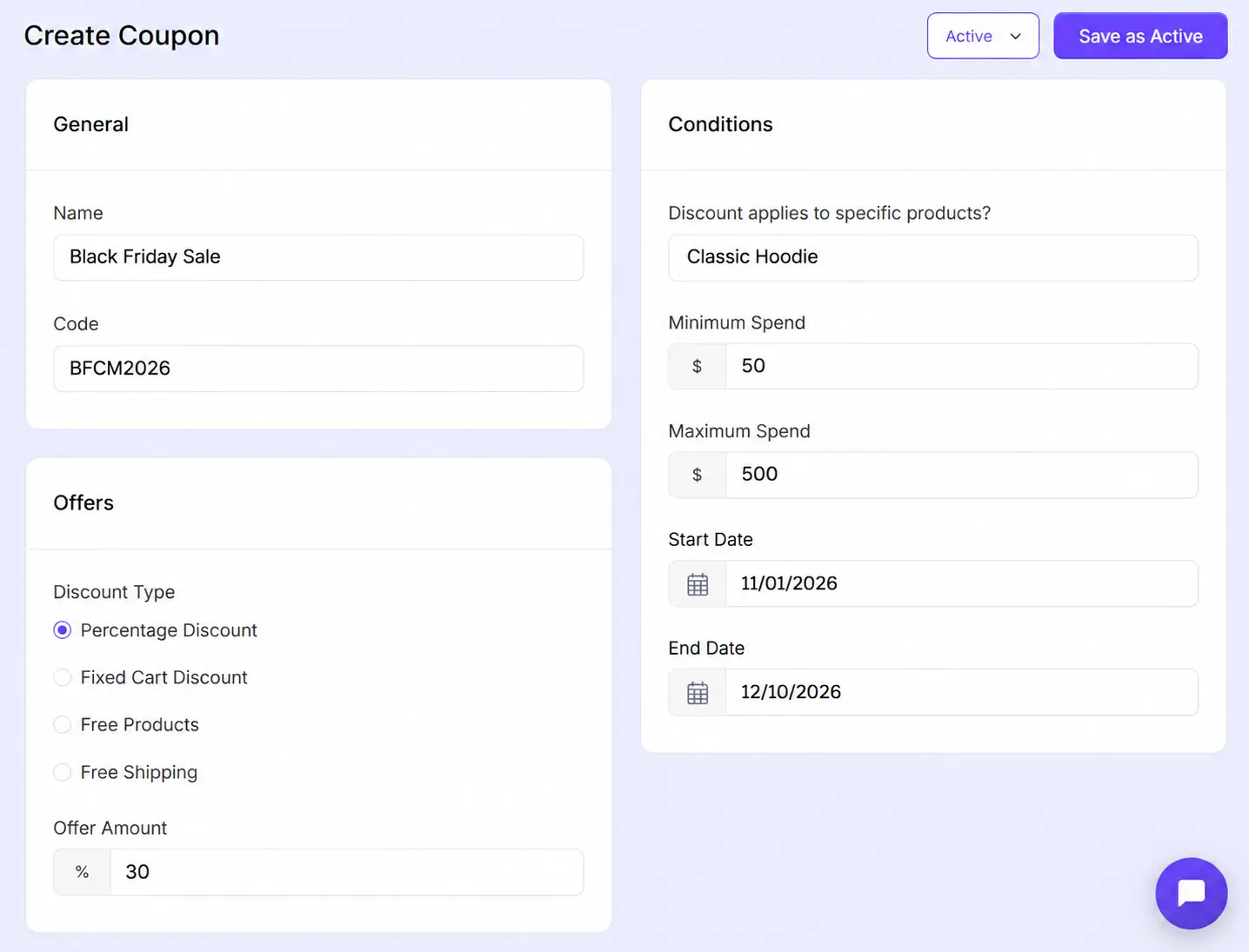
2. The Discount Doesn’t Apply at Checkout
Some shoppers arrive specifically to claim your advertised Black Friday offer. A failed coupon gives them an immediate reason to reconsider.
The cause may be a rule they cannot see. For example, BF30 might exclude products already on sale, including the item featured in your advertisement. A vague error message leaves the shopper unsure whether the code is broken or the product is ineligible.
The fix: Test every advertised code against eligible and excluded products. Check minimum spending requirements, variations, usage limits, and whether discounts can combine.
Where supported, apply the offer automatically. Otherwise, make the code easy to copy and explain its conditions near the promotion.
Show the discount as a separate line in the cart so shoppers can confirm it worked. Our guide to setting up your Black Friday discount explains how to structure the offer without losing profit.
3. Delivery Is Too Slow for Holiday Gifts
A good price may not matter if the order will arrive too late. Baymard found that 20% of respondents in its non-browsing breakdown cited slow delivery.
Holiday purchases can make that concern more pressing. Someone buying a gift needs to know whether it will arrive before the occasion.
The fix: Show a realistic delivery window on product and cart pages. Distinguish processing time from shipping time, and only promise a holiday cutoff your fulfilment team can meet.
For example:
“Order by December 15 for estimated delivery before Christmas.”
If you sell downloadable products, explain when access becomes available. Use “Instant download after successful payment” only when that accurately describes your delivery process.
Part 2: Checkout Steps That Make Buying Difficult
Once a shopper accepts the price and delivery terms, completing the order should feel straightforward. Unnecessary steps, confusing fields, and payment obstacles can interrupt that progress.
4. Forced Account Creation
Baymard found that 18% of respondents cited being required to create an account.
For someone buying from you for the first time, registration adds another task: choosing a password, confirming an email, or deciding whether they want an ongoing account.
The fix: Offer guest checkout where your product and fulfilment requirements allow it. Make that option easy to find beside the sign-in form.
If accounts provide useful benefits, explain those benefits and offer registration after purchase where supported. For subscriptions, memberships, or other account-dependent products, explain why an account is necessary.
5. A Checkout With Too Many Fields
A long checkout asks customers to do more work before paying.
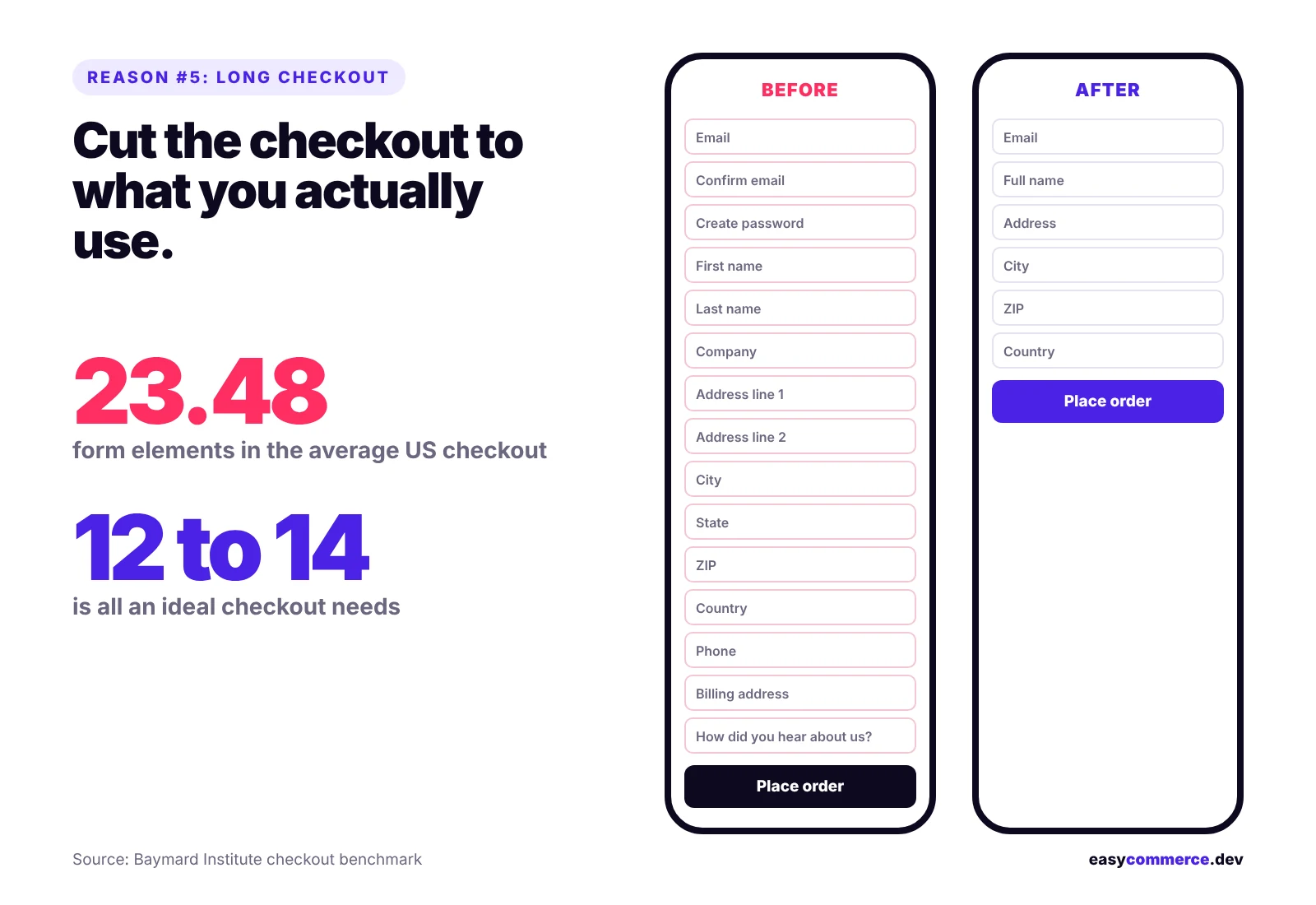
Baymard’s benchmark distinguishes between form elements and form fields. The average US checkout displays 23.48 form elements, while a streamlined flow can use 12–14 elements, including around seven or eight actual fields.
These are research benchmarks, not a requirement that every store use the same number.
The fix: Review each field and ask whether you need the information to process the order.
Company names and second address lines can often be optional. Request a phone number only when you need it, and explain why. Avoid making customers enter the same address twice when billing and shipping details match.
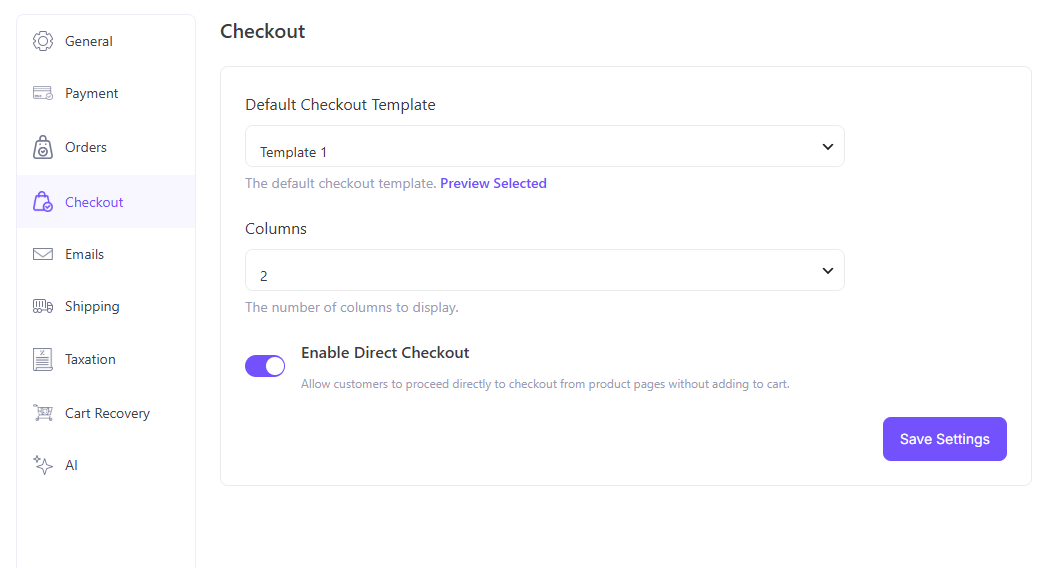
EasyCommerce’s Checkout Editor add-on lets you hide or rearrange fields without code. Test the complete purchase flow after making changes.
6. A Mobile Checkout That’s Hard to Use
When did you last place an order from your own store on a phone using mobile data?
According to Adobe’s 2025 holiday recap, mobile generated 55.2% of US online sales on Black Friday, worth $6.5 billion.
That does not measure mobile abandonment, but it shows why a working mobile checkout deserves attention.
Common obstacles include tiny buttons, fields hidden behind the keyboard, difficult dropdowns, and forms that clear after an error.
The fix: Place a real test order on your phone over mobile data. Check that you can select a variation, apply a discount, enter an address, and pay without zooming or losing information.
Test autofill and payment-error recovery too. A checkout should preserve valid entries when something goes wrong.
7. A Missing Payment Method or a Declined Card
A shopper can reach the final step and still be unable to complete the purchase.
In Baymard’s research, 10% cited a declined card and 9% cited insufficient payment methods.
Payment preferences also vary. Adobe reported that buy now, pay later accounted for $20 billion in US online spending across the 2025 holiday season.
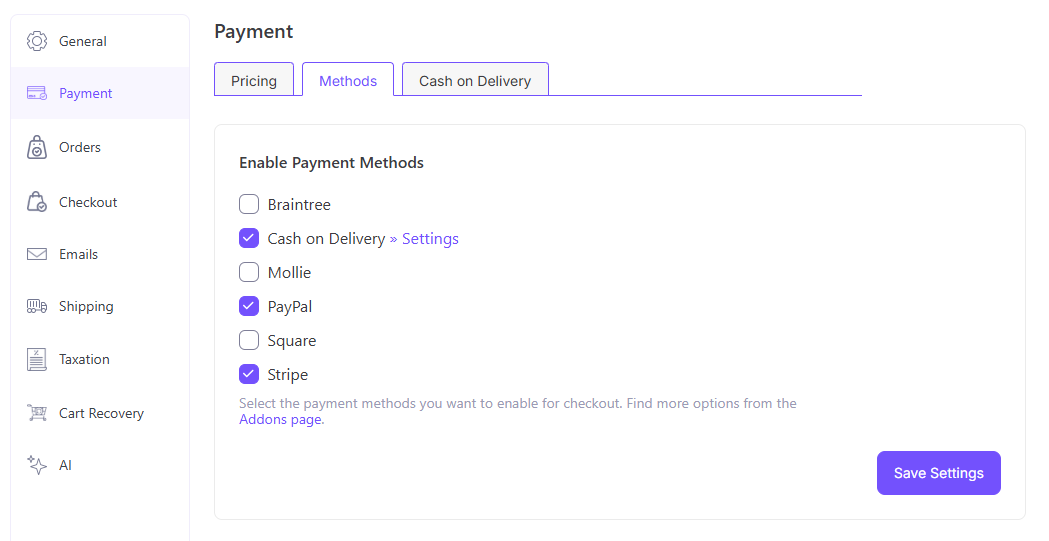
The fix: Offer payment options that fit your customers and markets. Depending on your audience, that could include cards, PayPal, digital wallets, or local methods.
Explain payment failures clearly where possible. Let shoppers retry or select another method without rebuilding their order.
EasyCommerce supports gateways including Stripe, PayPal, Square, Mollie, and Braintree. The payment options available to customers depend on your gateway configuration and eligibility.
Part 3: Website Errors and Trust Concerns That Stop Sales
A customer may want the product and accept the price but still hesitate because the store feels unfamiliar or the checkout stops working.
8. A Slow or Crashing Site Under Black Friday Traffic
Baymard found that 17% of respondents cited website errors or crashes.
A store that works during quiet periods can still struggle when more customers browse, apply coupons, and pay at once. A manual test order checks functionality, but it does not establish how much traffic your store can handle.
The fix: Test the full purchase flow before the sale. Ask your host about expected traffic, capacity, backups, and support availability.
Avoid untested changes during peak sales. Test necessary fixes in staging and keep a rollback plan.
Our guide to testing your checkout before Black Friday walks through the purchase checks to complete before launch.
9. Doubts About Security and Return Policies
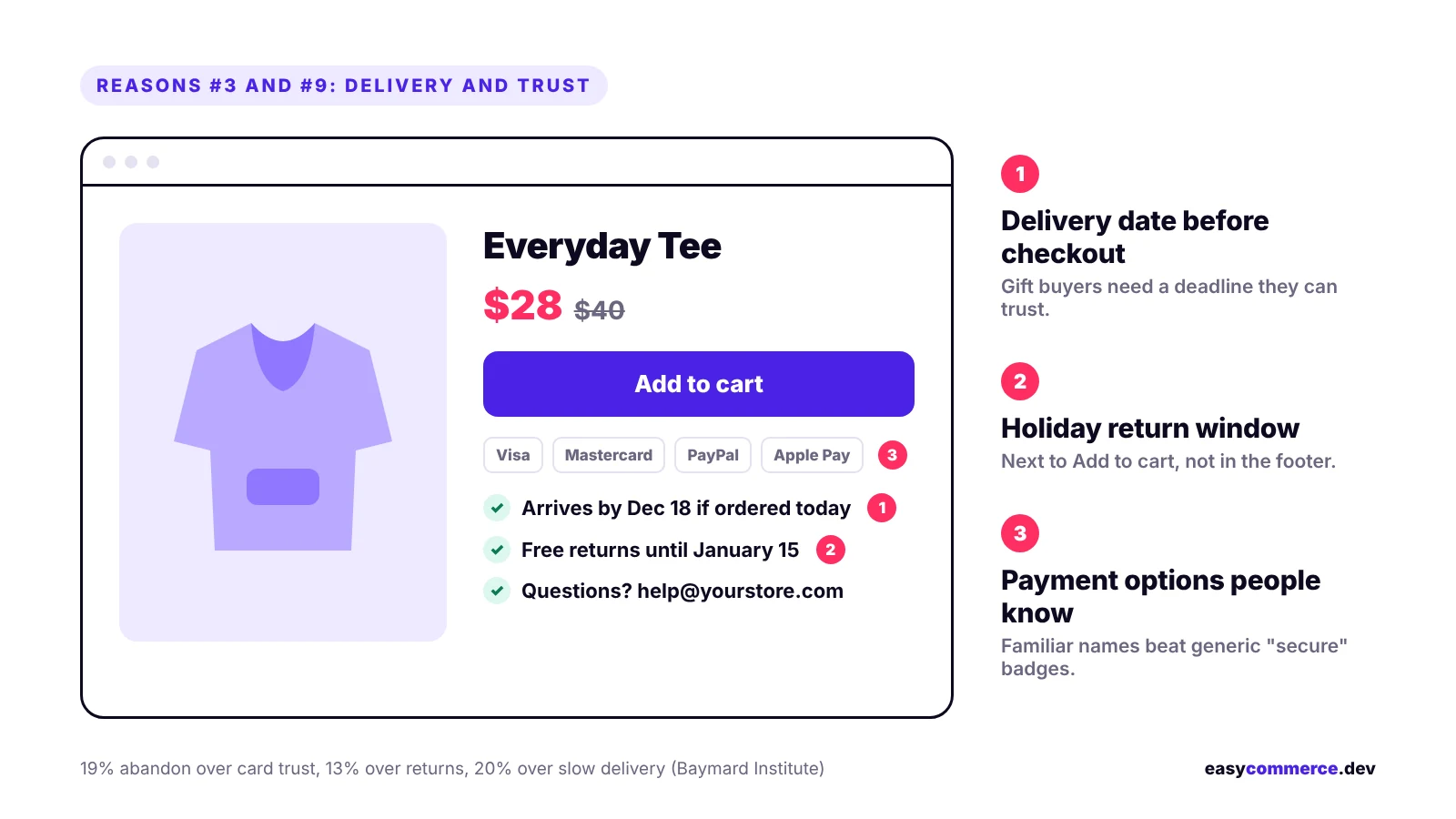
Buying from an unfamiliar store involves uncertainty. Shoppers want to know who they are paying, how to contact you, and what happens if the product is unsuitable.
Baymard found that 19% cited concerns about sharing card information, while 13% cited an unsatisfactory return policy.
The fix: Make your contact information, payment options, and return terms easy to find. Show payment logos only for methods you actually accept.
Put a short return-policy summary near the purchase button and link to the full conditions. If you offer extended holiday returns, state the deadline and any exclusions clearly.
For digital products, explain the refund terms that apply rather than borrowing a physical-product return promise.
Part 4: Why Some Shoppers Leave, and How to Bring Them Back
Some shoppers will leave even when checkout works well. Recovery messages can remind interested customers to return, provided you have captured their email address and can send the reminder appropriately.
10. Shoppers Who Were Only Comparing Deals
Baymard found that 42% of US online shoppers reported abandoning a cart because they were browsing or were not ready to buy.
During a sale, a cart can act as a shortlist. Someone may save products across several stores before choosing what to purchase.
You cannot remove this behavior with a shorter form. You can make returning easier by preserving cart contents where supported and clearly showing the price, delivery terms, and offer deadline.
Time Your Recovery Emails Around the Deal Deadline
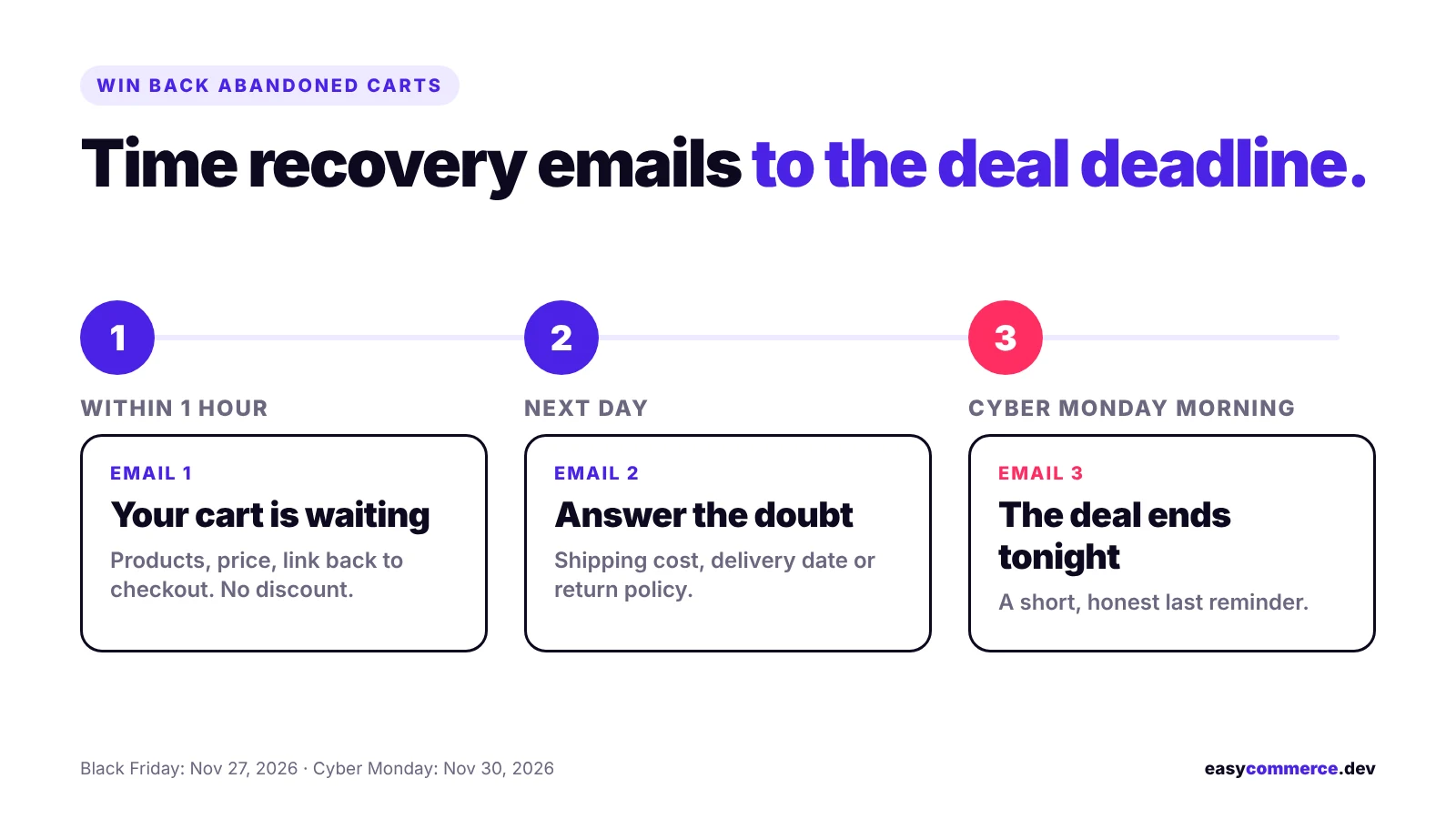
An email promoting an expired discount creates confusion. Plan reminders around your actual sale deadline.
Use this sequence as a starting point to test:
- After a short delay: Send a reminder showing the products left behind and a link back to the cart. One hour is an initial timing to test.
- Later, if time allows: Address a likely concern, such as shipping charges, delivery estimates, or refund terms.
- Before the offer ends: Send a final reminder with the correct deadline and time zone.
Skip messages when the sale is about to end rather than sending several close together. Stop reminders after purchase and check that overlapping campaigns do not create duplicates.
EasyCommerce provides abandoned cart recovery and reminder tools. Check the scheduling options in your current version before setting up the sequence.
Should You Add an Extra Discount to Recovery Emails?
Not automatically. Your Black Friday offer may already give customers a good reason to buy.
Before adding another discount, consider why they left. A clearer delivery estimate or a working payment method may solve the problem without reducing your margin.
Repeatedly rewarding abandonment with a lower price can also encourage customers to wait for another offer. If you test an extra incentive, measure completed orders and profit—not just email clicks.
Final Words: What to Fix Before Black Friday
Start with problems that stop a willing shopper from buying: unexpected costs, broken discounts, unnecessary account requirements, and payment errors.
Then check the experience on a phone and confirm that delivery and return information are easy to find. These changes can reduce avoidable abandonment, although they will not turn every cart into an order.
Use the table to choose your first checks, then test each change before the sale. Once checkout works reliably, set up recovery reminders for shoppers who need more time.
If you are evaluating platforms for a new store, EasyCommerce is free to download. You can also explore the EasyCommerce Pro Black Friday offer: 70% off until December 10.
Frequently Asked Questions
There is no universal Black Friday benchmark. Baymard’s general ecommerce average is about 70%, but your rate depends on your products, traffic, and customers. Compare your store’s results over time.
Test an initial reminder after about an hour. Adjust later messages to your sale deadline, and stop reminders once the customer purchases.
It removes a potential obstacle for shoppers who do not want an account. Offer it where your products and fulfilment process allow it.
Fix checkout problems first. Recovery emails are less useful when they bring shoppers back to the same broken coupon, unexpected charge, or payment error.