
Ask ten new store owners what they worry about most, and the answers cluster around the same themes: getting traffic, pricing competitively, converting visitors. Inventory management rarely makes the list. It sits in the background, treated as an operational detail that will sort itself out.
That assumption is expensive.
A product listed as available when it is not. A warehouse shelf holding six months of stock nobody is buying. A supplier delay that empties your best-seller during your busiest week. These are not edge cases. They are what happens when inventory management gets treated as an afterthought rather than a foundation.
This guide covers everything: what inventory management means for an online store, why getting it wrong costs real money, the methods and metrics that work, the mistakes most stores make, and how to choose the right tools when you are ready to stop managing stock manually.
TL;DR
- Inventory management covers purchasing, storage, tracking, fulfillment, and returns – not just counting products on a shelf.
- Overselling and stockouts are different failures. Overselling (accepting orders you cannot fulfill) is more costly because it deceives customers before disappointing them.
- Poor inventory costs retailers $1.77 trillion a year. 69% of shoppers abandon when out of stock. 40% who receive a cancellation email never return to the brand.
- Going from 1 to 2+ channels is exponential, not linear. Sync complexity multiplies with each added channel – and spreadsheets break with 1–3% data entry error rates.
- Five inventory methods to know: FIFO, LIFO, JIT, ABC Analysis, and EOQ. Most stores combine FIFO + ABC Analysis as a baseline.
- Six KPIs to track: inventory turnover, days of inventory, stockout rate, carrying cost %, fill rate, and sell-through rate.
- Five most common mistakes: treating all SKUs equally, ignoring channel-specific demand, setting safety stock once and forgetting it, missing in-transit inventory, and manual reconciliation.
- When choosing inventory software, evaluate: sync architecture (webhooks vs. polling), multi-location support, integration depth, automation rules, forward-looking reporting, and pricing scalability.
- Automated systems reduce stockouts by 30%. AI forecasting is now accessible to stores of any size – 46% of companies already use it, with 45% reporting a 60% reduction in stockouts.
What Is Inventory Management?

Inventory management is the process of ordering, storing, tracking, and selling your products, from the moment stock arrives to the moment it ships to a customer.
In practice, it is the system that answers one straightforward question: do you have the right products available, in the right quantities, at the right time, without tying up more cash than necessary?
For Ecommerce, that question gets complicated fast.
More Than Just Counting Products
Inventory management is not a single task. It is a chain of connected decisions and processes:
- Purchasing: Deciding what to stock, how much to order, and when
- Storage: Knowing where products physically are and in what condition
- Tracking: Keeping accurate, real-time counts across your entire catalog
- Fulfillment: Matching the right stock to the right order, accurately and on time
- Returns: Getting returned items back into usable inventory, or writing them off properly
A gap in any one of these creates problems downstream. A purchasing mistake leads to overstock. A tracking failure leads to overselling. A return that is not logged properly turns into a phantom stock count that catches you off guard.
Why Ecommerce Makes This Harder Than Traditional Retail
In a physical store, someone can walk the floor and notice a shelf running thin. In an ecommerce store, that shelf is digital. A product stays listed as “in stock” until a system or a person updates it. Online orders arrive at any hour, including when nobody is watching.
This is why automation matters so much in ecommerce specifically. Manual processes that hold up at 30 orders a month start failing visibly at 300.
How Poor Inventory Management Costs Real Money
Retailers and ecommerce businesses lose an estimated $1.77 trillion annually to inventory distortion, which is the combined cost of stockouts and overstocks, according to the IHL Group (2025). That figure covers large retailers. But the pattern plays out at every scale.
Overselling vs. Stockouts: Two Different Problems
Most store owners use these terms interchangeably. They are not the same thing, and the distinction matters for how you fix them.
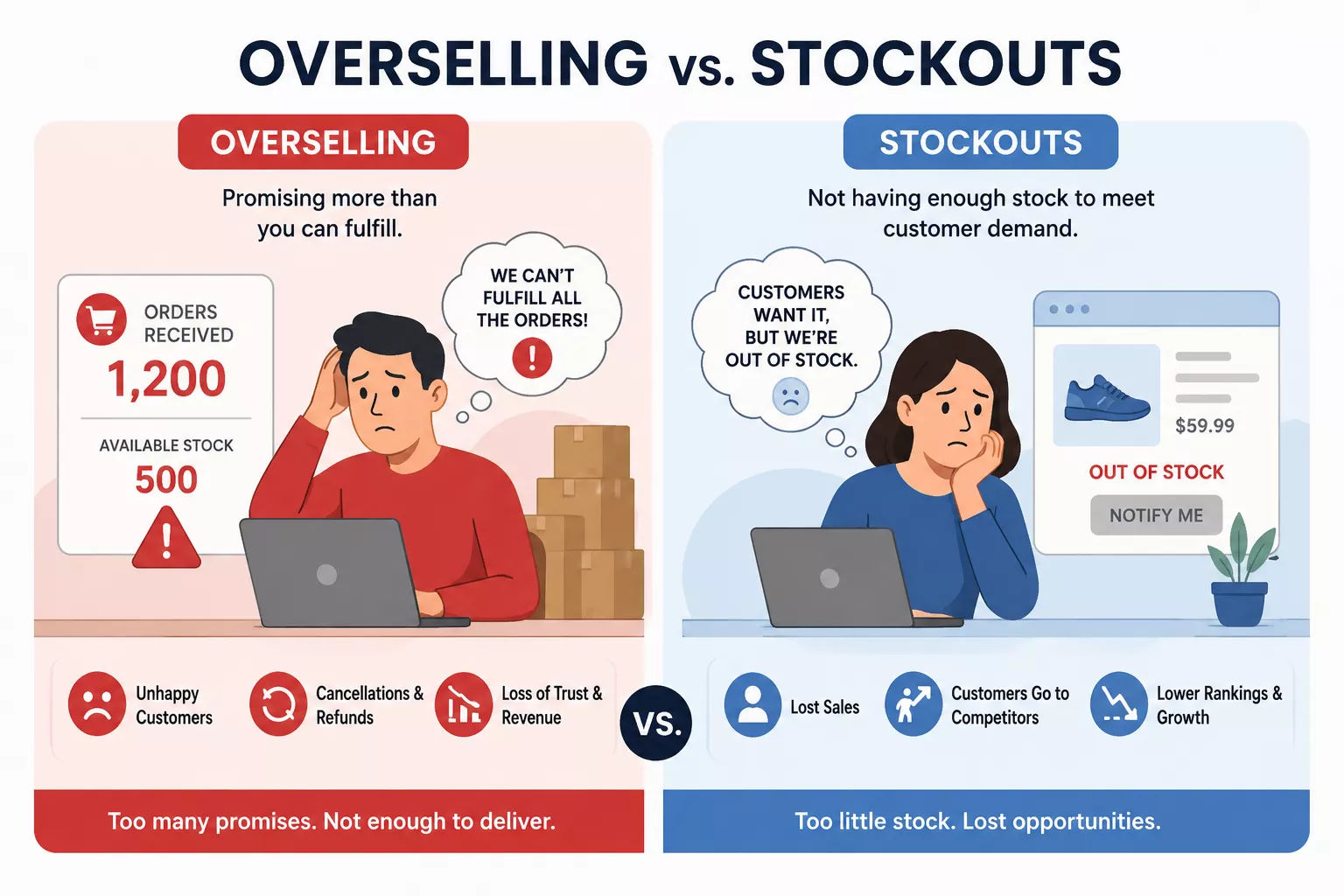
A stockout is when a product runs out, and your store correctly shows it as unavailable. Frustrating for the customer, but at least honest.
Overselling is when your store accepts and confirms an order for a product you do not actually have, because your inventory count was wrong. The customer pays, gets a confirmation, and then receives a cancellation email. That is a different category of failure entirely.
Research shows 40% of customers who experience a cancellation after placing an order will not return to that brand again. Not the stockout itself – the false confirmation followed by the reversal. That sequence destroys trust in a way a simple “out of stock” label never does.
Both problems trace back to the same root cause: inventory records that do not reflect reality. Overselling is the more expensive one because it deceives the customer before disappointing them.
The Stockout Problem
Even when your store correctly shows a product as unavailable, 69% of online shoppers will abandon their purchase rather than wait. They do not hold out. They find an alternative, often within the same session.
The average ecommerce store runs with an 8% out-of-stock rate. On any given day, roughly 1 in 12 products a customer wants is unavailable. That is an ongoing revenue leak most stores do not actively measure.
The Overstock Trap
The opposite problem is quieter, but equally damaging.
Overstock means ordering more than you can realistically sell within a reasonable timeframe. Products sit. Carrying costs accumulate, typically running 20 to 30% of total inventory value per year when you account for storage, insurance, depreciation, and opportunity cost. Stock that does not move eventually gets discounted to clear, often below margin.
Every dollar tied up in excess inventory is a dollar unavailable for marketing, product development, or anything else that drives actual growth.
What It Does to Customer Trust
Brands maintaining 95% or higher in-stock rates show measurably stronger customer retention and repeat purchase rates, according to Deloitte research. Consistent availability is a trust signal. When a customer can count on finding what they want, they come back. When they cannot, they shop elsewhere.
The Core Components of Ecommerce Inventory Management
Think of inventory management as five interconnected disciplines. They each cover different ground, and they all depend on each other.
Purchasing and Demand Forecasting
This is where everything starts: deciding what to buy, how much to order, and when. Effective purchasing requires a reasonable estimate of future demand, not just a backward look at last month’s sales.
Good demand forecasting accounts for seasonality, promotional calendars, supplier lead times, and market trends. Researching what your customers actually want before committing to large orders, rather than after, is one of the clearest ways to separate stores that grow predictably from those that constantly scramble.
Real-Time Stock Tracking

Periodic tracking counts stock on a schedule and updates records at fixed intervals. Perpetual tracking updates counts automatically in real time as sales happen.
For ecommerce, perpetual tracking is the only practical choice. Online orders do not pause while you are running an end-of-day count. If your stock figures are only as current as your last manual update, every transaction in between operates on stale data.
Low Stock Alerts and Reorder Points
A reorder point is the stock level at which you trigger a new purchase order. Setting one in advance removes a decision from daily operations and replaces it with a system.
Low stock alerts automate this further. When a product crosses its threshold, the system flags it. You are only pulled in when action is needed, not because you happened to notice a shelf looked thin.
Order Fulfillment and Returns
Every shipped order is an inventory event. Fulfillment accuracy depends directly on inventory records being correct at the moment of packing.
Returns add a layer most stores underestimate. A returned item that does not get logged back into inventory creates a discrepancy between what your system shows and what is actually on the shelf. Over months, those small discrepancies compound into meaningful counting errors.
Single-Channel vs. Multi-Channel Inventory Management
Not all inventory management challenges are equal. A store selling through one channel faces a fundamentally different set of problems than one operating across three or more simultaneously. Understanding where that complexity jump happens – and why – is important for any store planning to scale.
Why Single-Channel Is Manageable
When you sell through one channel, the data flow is linear. One source of orders, one inventory feed, one set of fulfillment rules. A sale reduces your stock by one. A return adds it back. The math is simple enough that a well-maintained system, even a spreadsheet, can handle a few hundred SKUs without major breakdowns.
Your risk of overselling is low, because only one system is decrementing inventory at any given moment.
The Multi-Channel Complexity Jump
The moment you add a second channel, that linearity breaks. Two systems can now sell the same unit of inventory simultaneously. If you have 15 units showing as available on both your website and a marketplace, a sale on one needs to immediately update the other. The delay between that sale and that update – even if it is just seconds – is where overselling incidents occur.
At three or more channels, the problem compounds further:
- Sync relationships multiply: With 3 channels, each sale must update 2 others. With 5 channels, each sale triggers 4 updates. Sync relationships grow with the square of the channel count, not linearly.
- Return flows diverge: A return on a marketplace goes through a different workflow than one on your own store. Different timelines, restocking rules, and inventory implications. Multi-channel returns are where many sellers first notice their counts have drifted out of sync.
- Channel-specific rules add complexity: Different platforms have different inventory policies, fulfillment SLAs, and listing requirements. Managing these consistently across multiple channels is where manual processes start showing visible cracks.
Why Spreadsheets Break at Scale
Spreadsheets work when the data flow is one-dimensional. They cannot receive real-time updates from multiple sources simultaneously. They cannot enforce rules that prevent two channels from selling the same unit at the same time.
Manual spreadsheet-based inventory management produces data entry error rates of 1 to 3%, meaning at 1,000 SKUs, there are 10 to 30 phantom discrepancies building at any given time. At low volume, those errors stay invisible. At higher volume, they surface as overselling incidents, stockouts, and operational failures that reach customers directly.
Inventory Management Methods Explained
There is no single best approach. The right method depends on what you sell, how it moves, and what your cash flow situation looks like. Here are the five most widely used frameworks for ecommerce store owners.
| Method | How it works | Best for | Limitations |
| FIFO | Oldest stock ships first. Inventory valued at the earliest purchase cost. | Perishable goods, fashion, seasonal items, any product where age reduces value. | Requires organised warehouse layout. Harder in multi-location setups without a WMS. |
| LIFO | Newest stock ships first. Valued at most recent purchase cost. | Specific accounting contexts under GAAP. Rarely the right operational choice for ecommerce. | Not permitted under IFRS. Leaves older inventory stranded. Generally avoid unless your accountant recommends it. |
| JIT | Stock ordered only as demand requires. Minimal inventory on hand. | Products with reliable fast suppliers. Made-to-order or custom items. High-carrying-cost products. | Extremely vulnerable to supply disruptions. One delayed shipment causes immediate stockouts. |
| ABC Analysis | SKUs ranked by revenue: A items (top 20%, ~80% of revenue) get tightest oversight. B and C proportionally less. | Any store with more than 50 SKUs. Best when operational bandwidth is limited. | Rankings must refresh regularly. A static ABC list drifts out of date within a quarter. |
| EOQ | Formula to find the order quantity that minimises total cost. EOQ = sqrt(2DS/H). | Stable-demand products with predictable ordering and holding costs. Good baseline calculation. | Assumes constant demand and costs – rarely true in ecommerce. Use as a starting point, adjusted for seasonality. |
Using These Together
These methods are not mutually exclusive. Most stores that manage inventory well use FIFO as their operational default, ABC Analysis to prioritise where attention goes, and EOQ as a starting calculation for order quantities adjusted for seasonality. JIT elements can be layered in for specific product lines where supplier reliability is high and carrying costs are prohibitive.
Key Inventory Metrics to Track
What you measure is what you manage. These six metrics give you a clear, ongoing read on inventory health. Track them by product category, not just as store-wide averages. A healthy aggregate number can easily hide a chronic stockout on your top-selling SKUs or dead stock quietly accumulating in another category.
| Metric | Formula | Benchmark | Why it matters |
| Inventory Turnover Ratio | COGS / Average Inventory Value | 4–8 turns/year | How efficiently you convert stock into revenue. Low = capital trapped. High = risk of understocking. |
| Days of Inventory (DSI) | 365 / Inventory Turnover | 45–90 days | Time-based version of turnover. DSI over 90 days signals a cash flow problem worth investigating. |
| Stockout Rate | (Stockout Events / SKU-Days) x 100 | <2% for A SKUs, <5% overall | How often customers hit an unavailable product. Industry average is 8% – significant improvement headroom. |
| Carrying Cost % | (Total Carrying Costs / Avg Inventory Value) x 100 | 20–30% per year | True annual cost of holding stock: storage, insurance, depreciation, damage. Often underestimated. |
| Fill Rate | (Orders Shipped Complete / Total Orders) x 100 | 95% or higher | Orders shipped in full without backorders or cancellations. Below 90% = systemic availability problems. |
| Sell-Through Rate | (Units Sold / Units Received) x 100 | 80%+ per selling period | Percentage of purchased stock that actually sold. Low rate = purchasing outpacing demand. |
5 Common Inventory Management Mistakes (and How to Fix Them)
Even experienced store owners fall into these. Each carries a specific, measurable cost – and a concrete fix.
Mistake 1: Treating All SKUs Equally
The problem: Applying the same reorder rules, review frequency, and safety stock levels to every product in the catalog. A product selling 200 units a month gets the same attention as one selling 3.
The impact: Top-selling SKUs run out because they were not monitored tightly enough. Slow-moving products accumulate excess stock because the same reorder formula over-purchases for low-velocity items. The result is stockouts on your best sellers and dead stock building on your worst performers simultaneously.
The fix: Apply ABC Analysis consistently. Give A-ranked SKUs tight reorder points, weekly review cycles, and meaningful safety stock buffers. C-ranked SKUs can run on looser settings with monthly checks. Same bandwidth, spent where it protects the most revenue.
Mistake 2: Ignoring Channel-Specific Demand Patterns

The problem: Forecasting demand as a single aggregate number across all channels rather than forecasting each channel independently.
The impact: Different channels have different demand patterns. A product that sells steadily on your own store can spike dramatically on a marketplace during a promotional event. Sellers who forecast in aggregate typically experience 15 to 25% higher forecast error than those who forecast by channel.
The fix: Build demand forecasts at the channel level, then aggregate them upward for purchasing decisions. Account for channel-specific events – platform sales days, promotional windows, algorithm changes – in each channel’s individual forecast.
Mistake 3: Setting Safety Stock Once and Forgetting It
The problem: Calculating safety stock levels when first setting up the system, then leaving them unchanged as the business evolves.
The impact: Demand patterns shift, supplier lead times change, and channel mix evolves – but the safety stock numbers do not follow. Levels that were appropriate six months ago may now be significantly off in either direction. A safety stock calculated for a two-channel operation will almost certainly be wrong for a four-channel one.
The fix: Recalculate safety stock at least monthly for all active SKUs, and weekly for A-ranked SKUs during peak seasons. Use actual variability data from the most recent 60 to 90 days rather than annual averages. Automate the recalculation wherever the system supports it.
Mistake 4: Not Tracking Inventory in Transit
The problem: Available-to-sell counts only reflect inventory physically in the warehouse, ignoring units ordered from suppliers but not yet received.
The impact: Without in-transit visibility, purchasing decisions are made on incomplete data. Reorders get triggered on products that already have a shipment on the way, creating double-ordering and inflated stock levels. Or teams mentally account for incoming stock without system support, delay reorders, and get caught by a supplier delay – causing stockouts.
The fix: Track in-transit inventory as a distinct status. Any purchasing decision should account for three numbers: on-hand (in warehouse now), in-transit (ordered and shipped, not yet received), and available-to-sell (on-hand minus stock allocated to open orders).
Mistake 5: Relying on Manual Reconciliation
The problem: Using CSV exports, spreadsheet updates, and copy-paste processes to keep inventory counts synchronised across channels.
The impact: Manual reconciliation is slow, error-prone, and impossible to scale. A single wrong entry creates a phantom discrepancy that builds into an overselling incident. For a store with three or more channels and several hundred SKUs, manual reconciliation can consume 40 to 80 hours of staff time per month – and it still runs behind because new orders create new discrepancies faster than old ones can be corrected.
The fix: Implement automated, real-time inventory synchronisation through a centralised system. Every sale, return, adjustment, and transfer should update all connected channels automatically. Manual reconciliation becomes a weekly audit check rather than a daily operational necessity.
How to Choose Inventory Management Software
The right tool becomes the operational backbone of your store. The wrong one adds complexity without solving the underlying problems. Here is what to evaluate – and why each criterion matters in practice.
1. Real-Time Sync Architecture
Inventory changes need to propagate across all connected channels in seconds, not minutes. Ask specifically about sync architecture: is it event-driven (webhooks that fire immediately when something changes) or polling-based (the system checks for updates on a schedule)? Event-driven sync is the standard to aim for. Polling-based sync creates windows where a sale on one channel has not yet updated another – and those windows are where overselling happens.
2. Multi-Location Support

If you fulfill from more than one location – your own warehouse plus a third-party logistics provider, or multiple fulfillment centers – the software needs to track inventory at the location level. That means independent stock counts per location, transfer management between locations, and order routing that accounts for stock availability and shipping proximity. A system that only maintains a single inventory pool forces location-level complexity back onto manual processes.
3. Integration Depth, Not Just Count
A platform claiming 200 integrations is less useful than one with 30 deep, bidirectional integrations that handle orders, returns, inventory updates, and catalog data in both directions. For most eCommerce stores, the integrations that matter most are the primary storefront, active marketplaces, fulfillment partners, and the accounting system. For each one, verify that the integration handles real-time inventory sync, automatic order import, and return processing – not just one-way data export.
4. Automation Rules
The value of inventory software comes from what it does automatically: reorder point triggers, low stock alerts by SKU and location, buffer stock rules that hold back inventory from specific channels, allocation rules that reserve stock for priority promotions, and routing logic for multi-location operations. If the software only shows you data without automating decisions, it is a reporting tool – not an operations tool.
5. Reporting That Looks Forward
The six KPIs covered earlier should be available out of the box, sliceable by channel, product category, and time period. More importantly, look for forecasting capabilities that surface what is likely to run out next week, not just what ran out last week. A system that only describes what has already happened does not prevent problems. A system that projects forward does.
6. Pricing That Scales With Your Business
Understand how pricing changes as you grow. Many platforms are priced by order volume, SKU count, or channel connections. A tool that is affordable at 500 orders per month may double in cost at 2,000, which is precisely when you need it most. Map out your expected growth trajectory and model what the tool costs at two and five times your current volume before committing.
Managing Inventory With EasyCommerce on WordPress
For WordPress store owners specifically, inventory management does not have to mean a separate plugin stack or a third-party tool bolted on after the fact. EasyCommerce handles product and inventory management natively, inside WordPress, without adding unnecessary complexity to an existing setup.
Built-In Inventory Tools, No Extras Required
EasyCommerce includes Low Stock Alerts, Product Catalog Management, and Order Management as core features, not premium add-ons. Low Stock Alerts notify you automatically when a product crosses its threshold, so you are never caught reacting to an empty shelf. Product Catalog Management covers your full inventory from one dashboard: create, edit, and organise products without switching between tools. Order Management tracks incoming orders in real time, keeping stock counts accurate as sales come in.
For a WordPress store owner running a physical catalog, digital products, or a combination of both, this covers the operational baseline without requiring a dedicated external platform.
How AI Features Speed Up Inventory Updates
When inventory changes, new products are added, variants are updated, seasonal catalog refreshes- the content work tends to pile up alongside it. EasyCommerce’s AI Copywriter generates product descriptions from a prompt, so new stock can go live without a writing backlog building up. The AI Image Generator creates high-resolution product images from text, useful when new inventory arrives without ready-to-use photography.
These are not inventory management features in the traditional sense. But they directly reduce the friction between receiving new stock and getting it listed, priced, and live in your store.
Who This Works Best For
EasyCommerce’s inventory setup suits WordPress store owners who want purchasing, tracking, alerts, and order management handled from one dashboard, without layering in extra plugins. If you are running a store and finding your current setup too fragmented, or starting fresh and want ecommerce without the overhead of a multi-tool stack, it is worth evaluating as an all-in-one option.
Best Practices for Managing eCommerce Inventory in 2026
Set Reorder Points Before You Are Desperate
The most common inventory mistake is not a system failure. It is the absence of a system. Store owners notice stock is critically low, then scramble to reorder from a supplier who needs two weeks.
A basic starting formula:
Reorder Point = Average Daily Sales x Supplier Lead Time (days) Add a safety stock buffer for any product with inconsistent demand. Revisit the calculation monthly for top-selling SKUs.
Stop Using Spreadsheets for Real-Time Stock
Spreadsheets work at very small scale. The moment order volume or SKU count grows, the cracks appear. Businesses using automated inventory systems reduce stockouts by 30% compared to those relying on manual tracking, according to Firework research. That gap is almost entirely attributable to human error in manual processes.
Apply ABC Analysis to Focus Your Attention
Classify your SKUs. Give A items tight reorder points, daily attention, and safety stock buffers. Give C items loose settings and periodic checks. Same operational bandwidth, spent more effectively.
Run Quarterly Stock Audits
Even with real-time tracking, physical inventory drifts from digital records over time. A quarterly audit catches discrepancies before they compound into customer-facing problems. For larger catalogs, cycle counting works as an alternative: audit a rotating subset of SKUs on an ongoing basis without stopping operations.
Use AI to Sharpen Demand Forecasting
According to Opensend, the AI market in inventory management is projected to grow from $7.38 billion in 2024 to over $27 billion by the end of the decade. Around 46% of companies now integrate AI into inventory systems to improve forecasting accuracy, with 45% of those reporting a 60% reduction in stockouts as a result (as per Deloitte via Zipdo, 2026).
The practical entry point for most eCommerce stores is tools that analyse sales velocity, flag slow movers before they become dead stock, and surface reorder suggestions based on seasonal patterns. That capability is no longer exclusive to enterprise retailers.
Conclusion
Inventory management does not come with the same visibility as marketing or product development. The wins are quieter. But the losses from ignoring it are loud.
Get it right and customers find what they came for, cash flows without getting trapped in slow-moving stock, and the business scales without constant firefighting. Get it wrong and you are leaking revenue through stockouts, locking capital in overstock, and eroding customer trust one cancelled order at a time.
The starting point is not complicated: set your reorder points, automate your low stock alerts, track the six metrics that matter, and audit regularly. Apply ABC Analysis to spend operational time where it protects the most revenue. Fix the five common mistakes before they compound. And when ready to scale past one or two channels, invest in software with the sync architecture and automation capabilities that manual processes cannot replicate.
The stores treating inventory as a strategic priority, not a logistics chore, are the ones that scale cleanly. Start treating yours that way now.
Frequently Asked Questions
Inventory management is the system you use to know what products you have, how much of each, where they are, and when to order more. For eCommerce businesses, it is what ensures a customer can actually buy what you are showing as available, and that you are not holding more stock than you can reasonably sell.
Inventory management is the broader discipline covering the full stock lifecycle: what to buy, how much, where to store it, and how to allocate it. Inventory control is the operational subset focused on physical accuracy - cycle counts, barcode scanning, bin location management, and reconciliation. Management is the strategy; control is what keeps physical counts aligned with your system records.
A stockout happens when a product runs out before you can restock it. Customers want to buy, but you have nothing to sell. Dead stock is the opposite: inventory sitting in your warehouse that is not moving, tying up cash and storage space. Both are inventory failures - just on opposite ends of the spectrum.
For most small stores, FIFO combined with ABC Analysis is the strongest starting point. FIFO keeps older stock moving first, reducing obsolescence risk. ABC Analysis focuses limited time on the products that drive the most revenue. As you scale past two channels or 200 active SKUs, adding formal reorder point calculations with safety stock prevents the stockouts that manual tracking inevitably misses.
At very small scale, basic tracking tools can work. But as order volume and SKU count grow, manual tracking introduces errors that become expensive quickly. Built-in inventory tracking, real-time stock updates, and automated alerts should be baseline requirements of whatever platform you are using - not optional extras you bolt on later.