For years, selling on WordPress meant one thing: install WooCommerce. It became the default because it made building an online store easy.
But not every business needs a full eCommerce system. Many WordPress store owners sell only a handful of products, digital downloads, or services, making a complete storefront with catalogs, carts, and dozens of extensions unnecessary. That extra functionality often brings slower pages, a heavier database, and more maintenance.
The good news is that in 2026, you can sell on WordPress without WooCommerce using faster, simpler solutions built for smaller stores.
This guide explains what you actually need to sell online, the best WooCommerce alternatives, common mistakes to avoid, and how to build a lightweight, high-performing store.
Can You Sell on WordPress Without WooCommerce?
Yes. You can sell on WordPress without WooCommerce, and plenty of successful stores do exactly that. WordPress is the content platform. WooCommerce is one ecommerce plugin that runs on top of it, not a requirement for taking payments.
You can accept money and deliver products with a simple payment button, a focused checkout page, or a lightweight ecommerce plugin that handles the whole store without WooCommerce’s overhead.
The reason this surprises people is history. For a decade, “sell on WordPress” and “install WooCommerce” were treated as the same sentence. They are not. The better question is not which store plugin to install, but which setup gives you the six parts above in the simplest way your store can get away with.
What Selling on WordPress Actually Requires
Before you pick a plugin, it helps to know what a sale actually needs. Selling online is not one feature. It is a short chain of jobs that have to work together, and once you can see the chain, the plugin decision gets much simpler.
Every online sale, from a single ebook to a monthly subscription, runs on the same six parts:
- Something to sell. A physical product, a digital download, a course, a membership, a booking, or a service. If a customer pays to receive it, it counts.
- A checkout. The one place where a buyer confirms the price, enters their details, and pays. A checkout is not the same as a cart or a catalog.
- A payment processor. Stripe, PayPal, or a regional gateway that actually charges the card. Your site never touches the money directly.
- Delivery or access. The download link, login, or confirmation that reaches the customer automatically after payment.
- A customer and order record. Who bought what, when, and for how much, so you can send receipts, handle refunds, and manage renewals.
- Transactional emails. The order confirmation, receipt, and access instructions buyers expect within seconds.
WooCommerce bundles all six into one storefront workflow. That is genuinely useful when you run a browsing-and-cart store. But if your site only needs a few of these parts, you are loading a full store engine to do a fraction of the work. That single realization is what opens up every lighter option below.
Why Store Owners Leave WooCommerce Behind
WooCommerce is capable software, and for large, complex catalogs, it earns its place. The friction shows up when a small or mid-size store carries the weight of a platform built for something bigger. Three costs come up again and again.
The tax complexity
Out of the box, WooCommerce handles the basics. Push past that, and you start bolting on extensions: one for subscriptions, one for advanced shipping, one for better invoices, one for cart recovery.
Each is another plugin to update, another thing that can break after a WordPress core update, and often another subscription fee. For a store selling a dozen products, the setup can feel out of proportion to the work it does. If you want the honest ledger on both sides, our breakdown of the pros and cons of WooCommerce lays it all out.
The database weight
Here is the part most guides skip. WooCommerce stores much of its product data by extending standard WordPress tables, especially wp_postmeta, the catch-all table WordPress uses for extra post details. As 20i explains in its guide to WooCommerce database optimisation, every product, variation, and coupon piles more rows into these shared tables, and queries slow down as the catalog grows.
Order data is better off: since WooCommerce 8.2 in late 2023, new stores default to High-Performance Order Storage, which keeps orders in their own dedicated tables instead of wp_postmeta. Stores running on older setups can still be on the legacy system unless they’ve migrated.
Product and variation data, though, still runs through the shared tables by default, and that’s where the bloat and query slowdown really show up as a catalog grows.
Speed costs you sales
Why does the weight matter so much? Because speed is money, and shoppers are unforgiving. Research compiled by ecomhint, drawing on Google and NitroPack data, found that a 0.1-second improvement in load time can raise retail conversions by around 8.4%, and that a large share of shoppers abandon a store that takes more than a few seconds to load.
Slow pages do not just annoy people. They quietly shrink revenue on every single visit, and the effect compounds across every campaign you run.
Ways to Sell on WordPress Without WooCommerce
The right method depends on how your site actually sells. Some stores need a full catalog. Many only need a clean way to get paid. Think of it as a spectrum, from the lightest possible setup to a complete store minus the WooCommerce weight.
Our roundup of the best WooCommerce alternatives goes wider, but these are the core approaches.
(i) Payment buttons and links
The lightest option is to skip a built-in checkout entirely. Stripe and PayPal let you create a payment link and drop it behind a Buy Now button on any page. This works for a freelancer collecting a deposit, a consultant charging for a call, or a single-product website. You can be live in minutes. The trade-off is control: no customer accounts, no automatic delivery, no real post-purchase experience. Most stores outgrow it fast.
(ii) Checkout pages for a single offer
A step up is a dedicated checkout page tied to one offer. A landing page explains the product, a button leads straight to payment, and the buyer converts without browsing a catalog.
This fits digital products, courses, templates, and service packages well. Fewer steps usually mean fewer drop-offs, so for a focused offer, this often converts better than a full store.
(iii) An all-in-one ecommerce plugin
When you want real products, inventory, taxes, orders, and customer accounts, but not WooCommerce’s footprint, a lightweight all-in-one plugin is the answer.
This is where EasyCommerce fits, and it is the option most store owners land on once they need more than a button but less than a heavyweight platform. More on that next.
EasyCommerce vs WooCommerce
So how do the two compare for a store that wants to stay light?
Here is a side-by-side on the points store owners actually care about. For the deep version, see our full EasyCommerce vs WooCommerce comparison.
| Point | EasyCommerce | WooCommerce |
| Setup | Guided wizard, live in minutes | Flexible, but more to configure |
| Data storage | Dedicated database tables for everything | Dedicated tables for orders only |
| Speed as you grow | Stays light | Needs maintenance and tuning |
| AI tools | Built-in shopping agent, writer, images | Not native, needs third-party plugins |
| Subscriptions | Native | Paid extension |
| Transaction fees | None added | None added by core |
| Extensions needed | Fewer, more built in | Often several for full features |
| Best fit | Small to mid-size stores wanting speed and simplicity | Large, complex catalogs needing a vast extension ecosystem |
To be fair to WooCommerce: its extension catalog is enormous, nearly every host is tuned for it, and for a large store with unusual requirements, that ecosystem is hard to beat.
The point is not that WooCommerce is bad software. It is that most stores do not need everything it carries, and end up paying for the weight anyway.
How to Set Up a Store on WordPress Without WooCommerce (Step-by-step)
Setting up a store on EasyCommerce takes minutes, not an afternoon. Here is the short version.
Step 1: Install the plugin
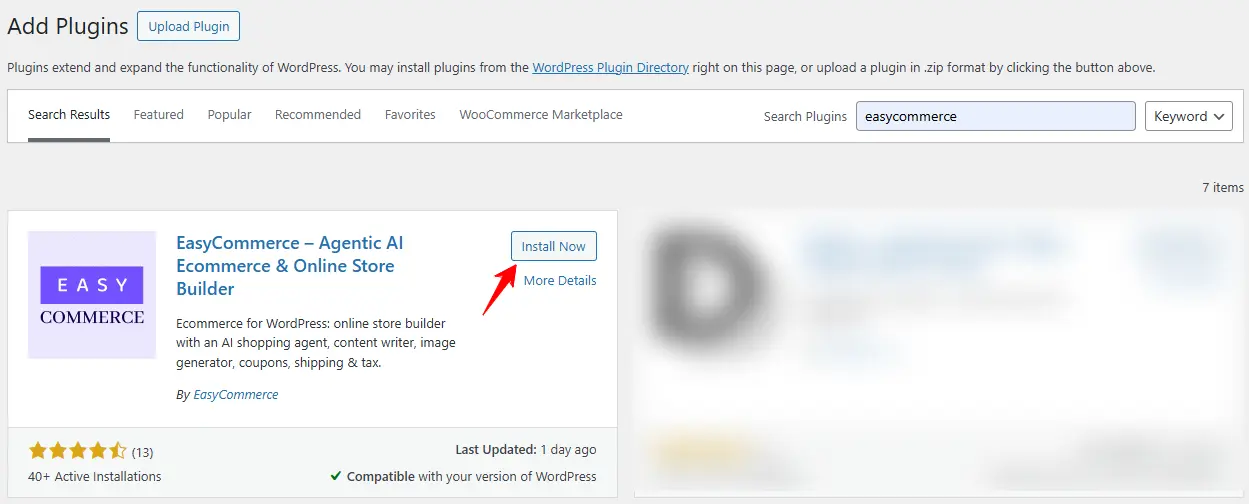
From your WordPress dashboard, add a new plugin, search for EasyCommerce, then install and activate. Or download EasyCommerce for free from WordPress.org.
Step 2: Run the setup wizard
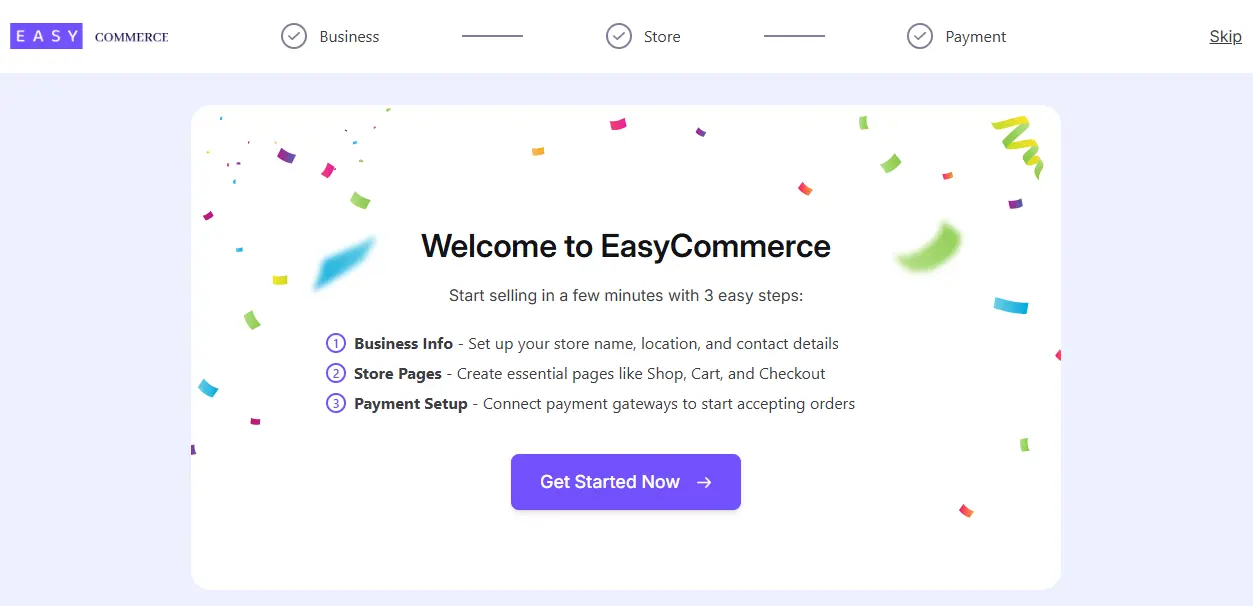
It walks you through store details, currency, and your key pages. No code, no manual page building.
Step 3: Add your first product
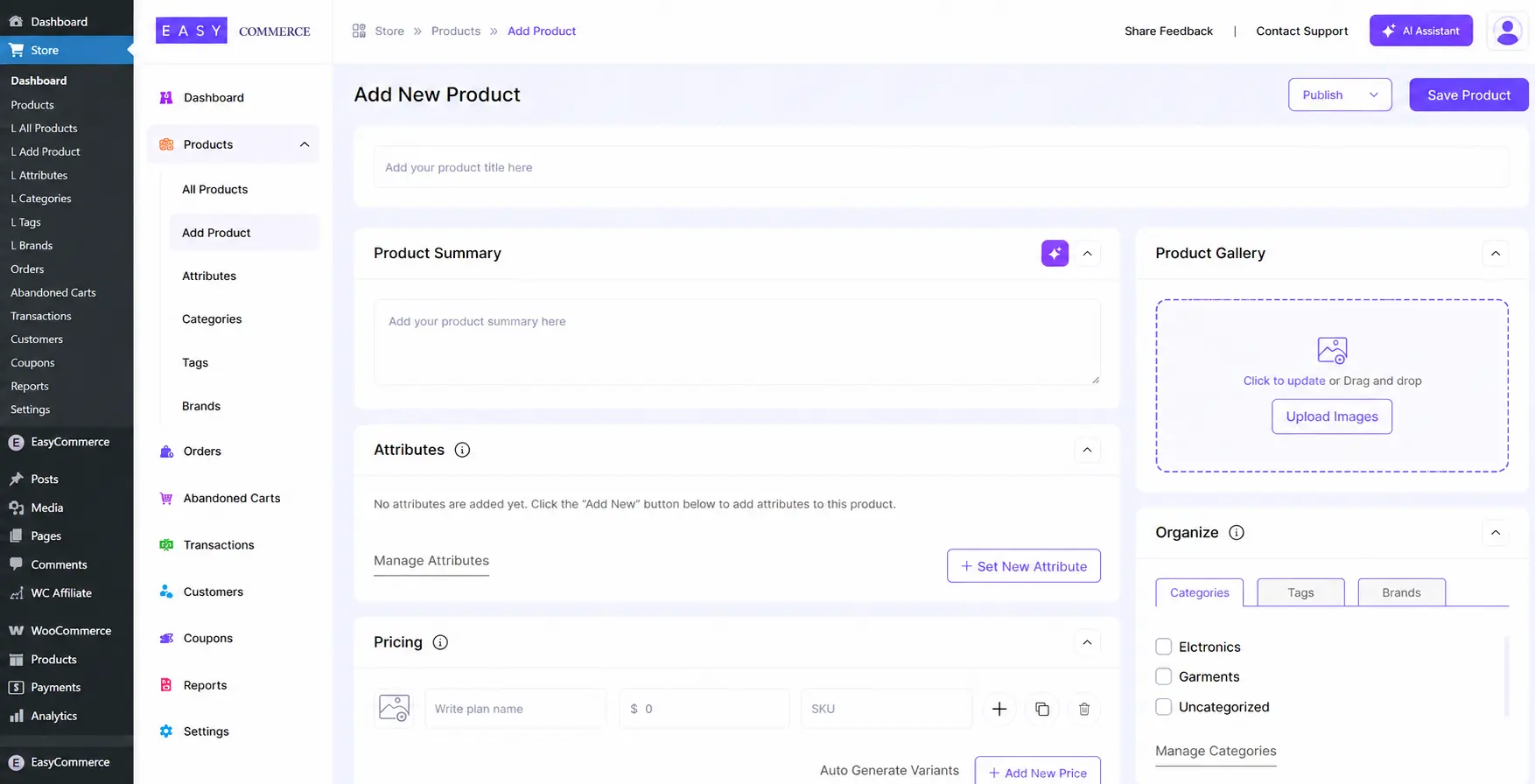
Set a name, price, and type: physical, digital, or subscription. Use the AI writer for the description if you want a head start.
Step 4: Connect a payment method
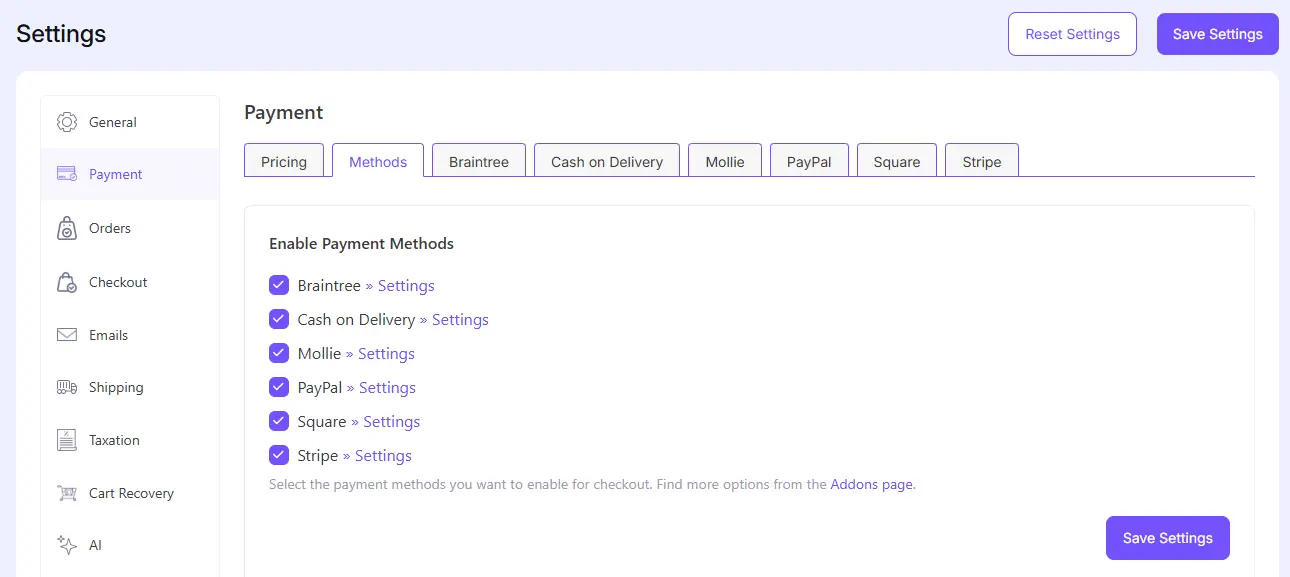
Enable Stripe, PayPal, or another gateway from the Addons page and enter your keys.
Step 5: Set tax and shipping
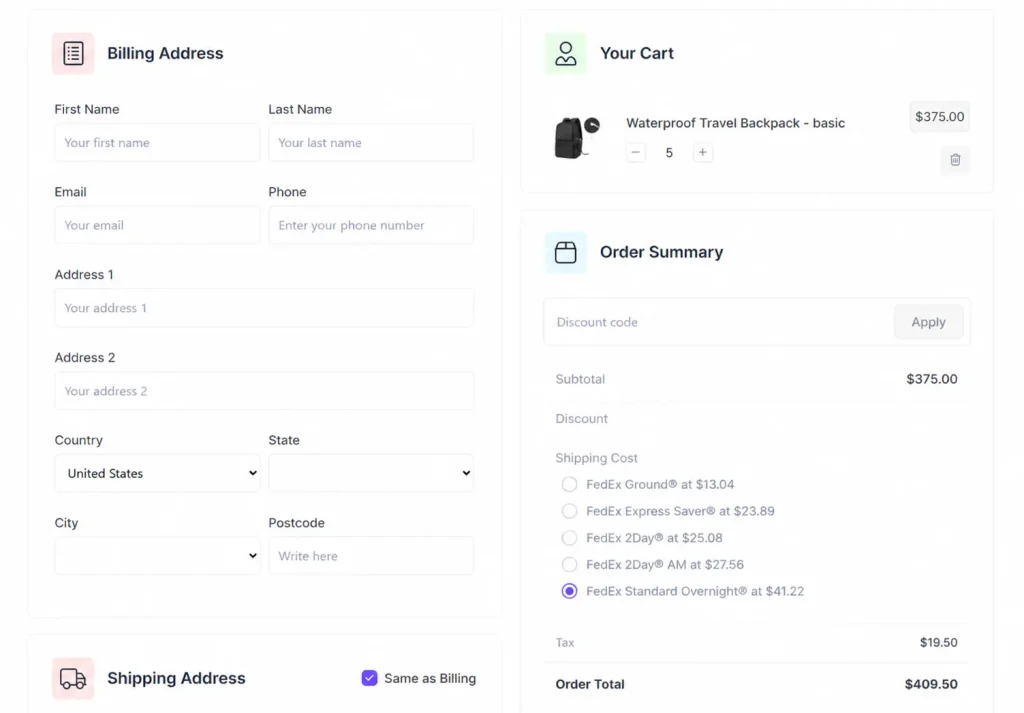
Turn on automatic tax rules for your region, and add shipping if you sell physical goods.
Step 6:Test, then launch
Run one real purchase, confirm the email and delivery, then share your store. The EasyCommerce documentation covers anything you get stuck on.
Run a Full Store Without WooCommerce Using EasyCommerce
EasyCommerce is an AI-powered WordPress ecommerce plugin built to run a complete store without the weight that pushes people away from WooCommerce. It sells physical products, digital downloads, subscriptions, and licenses, and it keeps your store data in its own dedicated database tables so the site stays fast as the catalog grows.
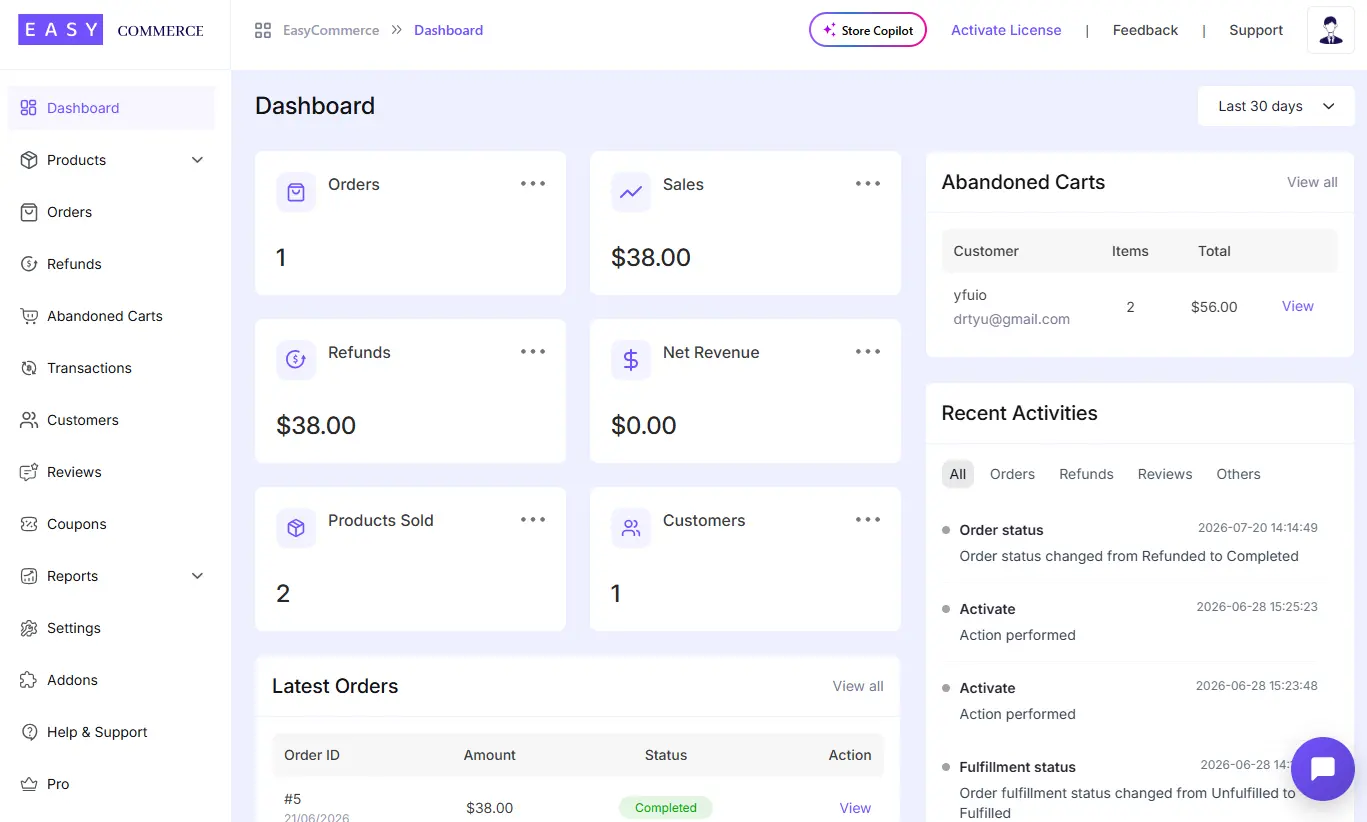
That last point is the direct answer to the database problem from earlier. Instead of piling everything into shared WordPress tables, EasyCommerce stores products and orders in tables built for the job. Your data stays in your own WordPress database, fully native, with no store logic offloaded to a third-party service.
On top of the essentials, it leans into AI in a way older plugins do not. The built-in AI Shopping Agent chats with a customer, searches your catalog, checks stock, creates the order, and generates a payment link, all through conversation, on your storefront and through Facebook Messenger.
See the AI Shopping Agent in Action
An AI Store Copilot sits in your dashboard to answer questions about your store data and take actions like updating stock. There is also an AI writer for product descriptions and an image generator, both running on free monthly credits.
The commercial basics are covered without nickel-and-diming. You get zero added transaction fees beyond what your processor charges, built-in abandoned cart recovery with personalized reminder emails, coupons, guest and direct checkout, support for 135+ currencies, and automatic tax rules.
The core plugin is free. And if you are moving an existing store, there is a guided path to migrate your WooCommerce store to EasyCommerce so you do not start from scratch.
6 Common Mistakes When Selling Without WooCommerce
Going lighter than WooCommerce is easy. Going lighter without breaking the buying experience takes a little care. Most problems are not technical; they are setup decisions made too early. Here are the ones that come back to bite store owners.
- Treating a contact form as a checkout. A payment field bolted onto a form takes money, but it does not create order records, receipts, or a way for a buyer to download their purchase again. Use a form when payment supports a process, like a booking fee. Use a real checkout when payment is the purchase.
- Skipping transactional emails. No confirmation after payment means uncertainty, and uncertainty means support tickets. Order confirmations, receipts, and access instructions are operational, not optional. It is often the first thing a customer notices.
- Not testing payments before launch. Run a real success and a real failure. Confirm the emails fire and access is granted. This is also how you catch broken webhooks, the silent failure where a customer is charged but never receives what they paid for.
- Ignoring taxes until the first sale. Depending on where you and your buyers are, you may owe VAT, GST, or sales tax. Configuring it before ordering one is far easier than untangling it after fifty. A plugin with automatic tax rules removes the guesswork.
- Leaving download links unsecured. A raw file URL gets shared, posted, and indexed. Downloads should be tied to a verified purchase, with access that expires or lives behind a customer account.
- Running with no customer or order history. Sooner or later, a buyer loses a receipt, wants an invoice, or needs to download again. Without records, every request becomes manual work that eats up your week.
Notice the pattern. Almost every mistake is something a proper store system handles for you: order records, secure delivery, automatic tax, and retries on failed payments. That is the real argument for a complete plugin over a pile of loosely connected parts.
Final Thoughts
The real lesson here is simple: match the tool to the store, not the store to the tool. WooCommerce is not the only way to sell on WordPress, and for a lot of stores, it is not the lightest or the smartest.
If you sell a few things, a payment button or a checkout page may be all you need. If you want a real store that stays fast, EasyCommerce gives you products, orders, AI, and customer management without the database weight and plugin sprawl.
You do not have to start heavy to sell online. Begin with what your store actually needs, then add from there.
Frequently Asked Questions
Yes. You can sell on WordPress without WooCommerce at no cost. A Stripe or PayPal payment button is free to set up, and EasyCommerce's core plugin is free with zero added transaction fees. You only pay your payment processor's standard rate on each sale.
It can be, mainly because of how data is stored and loaded. WooCommerce extends shared WordPress tables and loads store logic broadly, while plugins that use dedicated tables and load commerce code only when needed tend to stay lighter as the catalog grows. Speed is worth chasing: even a 0.1 second improvement in load time can lift retail conversions noticeably.
Yes, and for downloads it is often the better call. You can deliver ebooks, templates, courses, or license keys through a checkout plugin like EasyCommerce, which ties each download to a verified purchase. That keeps your files secure and delivery automatic, without running a full storefront.
No. Modern WordPress ecommerce plugins are built for non-developers. EasyCommerce uses a setup wizard and the standard block editor, so you can list products, connect payments, and launch without touching a line of code.
Not if your store does not depend on browsing. Many businesses sell one product or a small set, where a focused checkout converts better than a catalog full of choices. If you do need browsing, inventory, and multiple products, an all-in-one plugin gives you all of that without WooCommerce's overhead.
Yes. If you start light and grow, or simply want off WooCommerce, you can move your products, orders, and customers across. EasyCommerce includes a migration addon that transfers an existing WooCommerce store without rebuilding it by hand.