A one-time customer is a sale. A subscriber is revenue you can forecast, as long as the card keeps working. And that is the catch. Ecommerce subscriptions lose 4.25% of subscribers every month, and 1.38 points of that is payments that simply failed, according to Recurly’s churn benchmarks. Nobody decided to leave.
The market is worth the effort. Fortune Business Insights projects subscription ecommerce at about $3.09 trillion in 2026, growing 14.4% a year. But WordPress has no billing engine, so you can’t sell subscriptions with WordPress out of the box. You need a plugin that charges on a schedule, creates renewal orders and lets customers manage their own plans.
This guide walks through the full setup with EasyCommerce, then covers the parts most tutorials skip: how to test a renewal (not just the first payment), what the law expects from you, how EasyCommerce compares with WooCommerce Subscriptions and SureCart, and where it falls short today.
In this guide, you will learn
- What it means to sell subscriptions with WordPress
- Step-by-step setup (7 steps)
- Choosing a pricing model
- Reducing failed payments and churn
- Consent and cancellation rules
- EasyCommerce vs WooCommerce Subscriptions vs SureCart
- What it costs
What Does It Mean to Sell Subscriptions with WordPress?
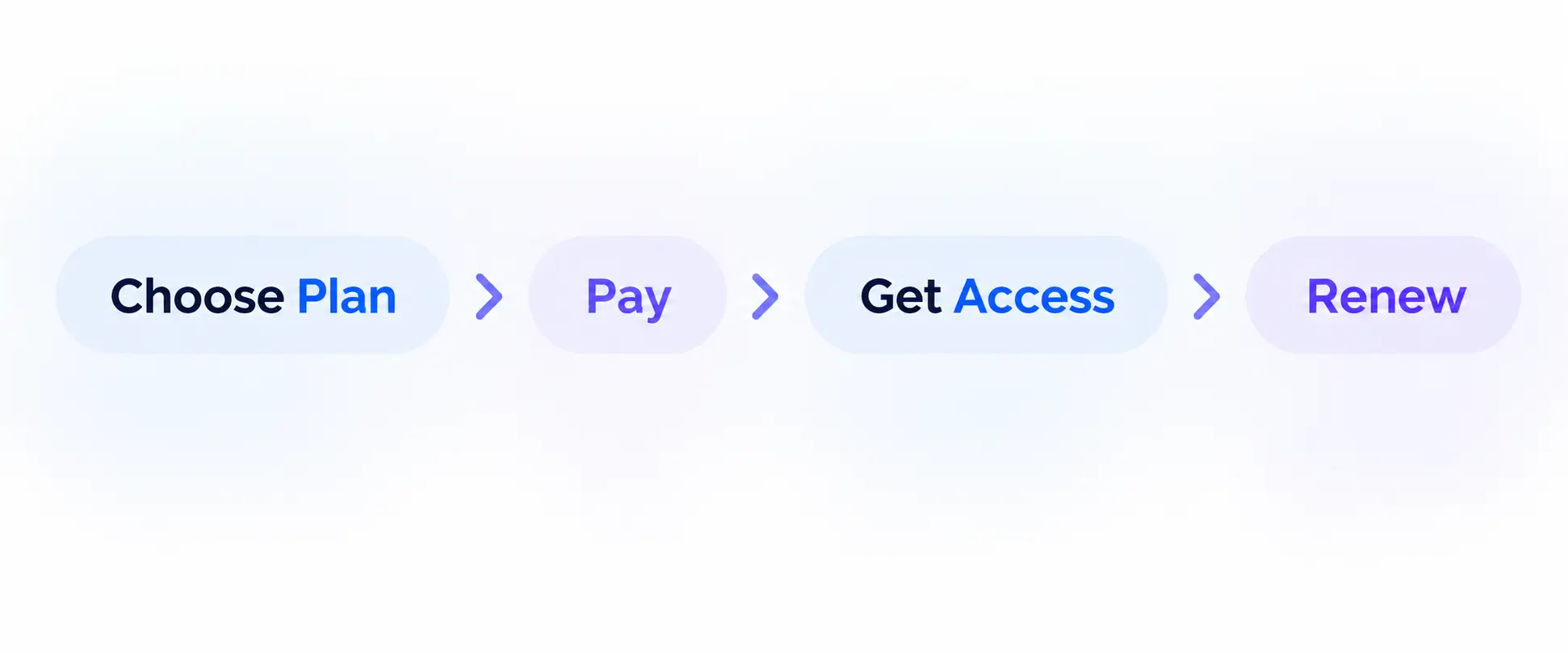
Selling subscriptions with WordPress means charging a customer automatically on a repeating schedule, such as weekly, monthly or yearly, for a product or access you keep delivering. A plugin creates the charge, a gateway like Stripe collects it, and the customer manages the plan from their account.
Subscriptions vs memberships
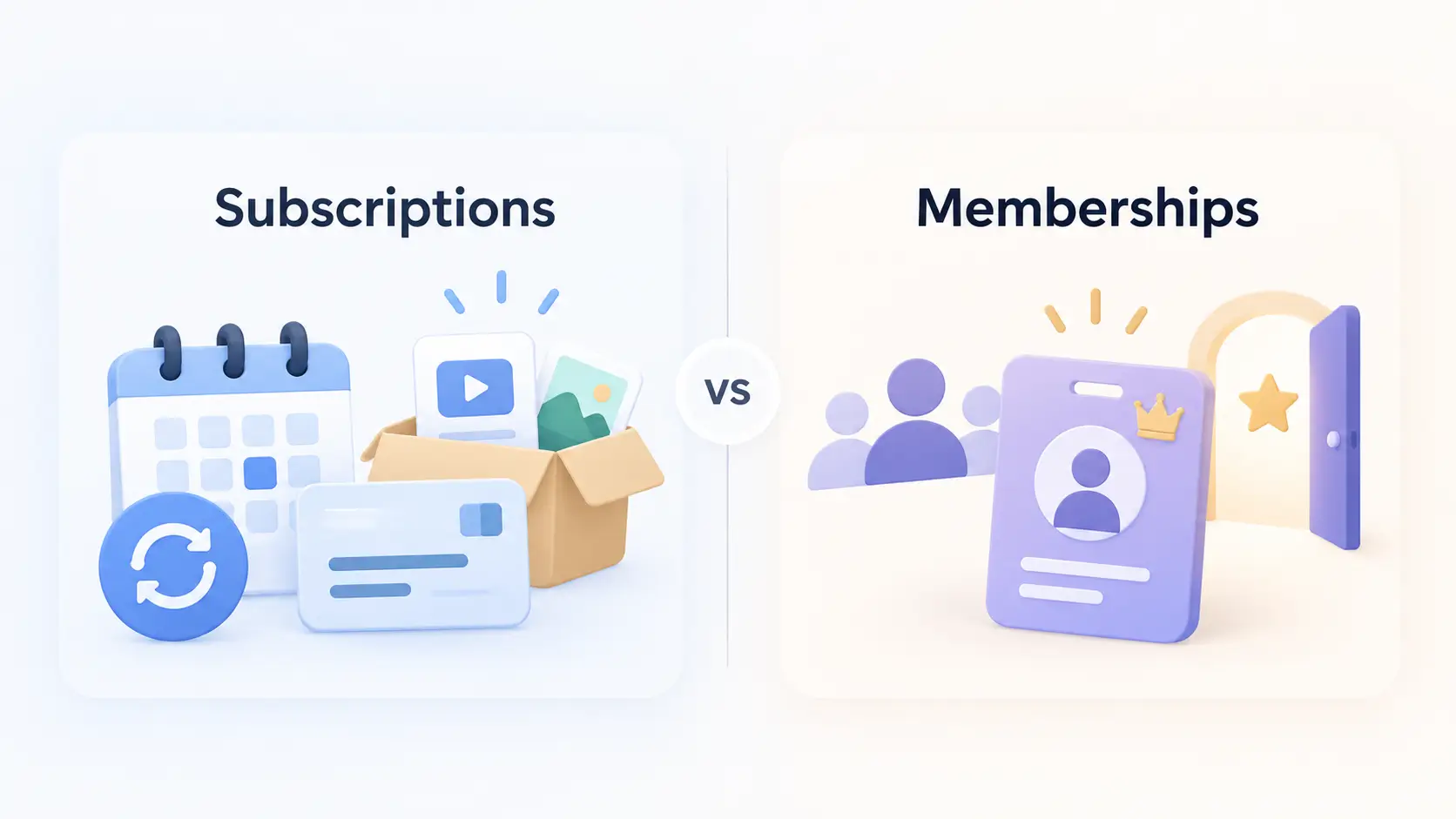
A subscription is a billing arrangement: pay again every period. A membership is an access arrangement: you unlock content or perks while you are a member. A subscription can exist without a membership (a monthly coffee box), and a membership can be a one-time purchase (lifetime access).
If the hard part is repeat billing, you need a store plugin with subscription support. If it is locking pages, add a membership plugin. EasyCommerce handles billing, not content locking.
What can you sell as a subscription?
Almost anything with ongoing value: software access, courses, digital libraries, paid communities or physical boxes. EasyCommerce sells digital and physical products from one store, so a hybrid catalogue (a digital course plus a monthly kit) doesn’t need two systems. For downloads, start with our guide to selling digital products with WordPress. For software, the license manager can extend license expiry when a subscription renews.
No store yet? Build an ecommerce store in WordPress with EasyCommerce first.
How to Sell Subscriptions with WordPress, Step by Step
To sell subscriptions with WordPress using EasyCommerce: install the plugin and the Subscriptions add-on, connect Stripe, turn on a subscription for a product, set your renewal emails, test with sandbox cards, then go live.
Step 1: Install EasyCommerce and the Subscriptions add-on
The core plugin is free. Subscription management is a Pro add-on that needs a valid EasyCommerce license. EasyCommerce’s pricing page lists Pro plans from $199 a year for one site, so confirm the add-on is included in the plan you buy.
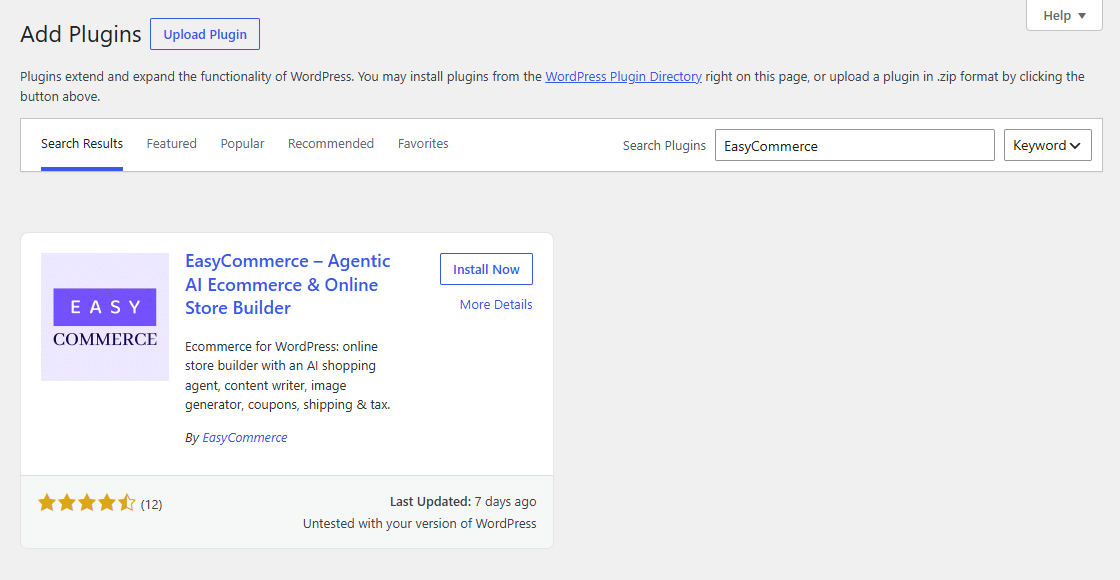
1. Go to Plugins > Add New, search for EasyCommerce, then install and activate it.
2. Install and activate EasyCommerce Pro, then activate your license.
3. Open the EasyCommerce License screen and activate EasyCommerce Subscriptions.
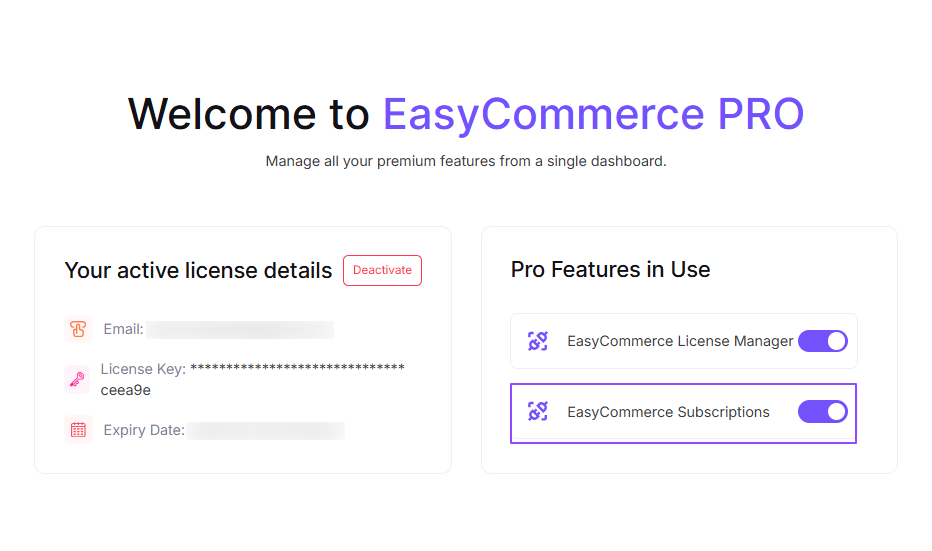
A Subscriptions menu item and a Subscriptions report now appear. The full feature list is on the EasyCommerce Subscriptions page.
Step 2: Connect Stripe for recurring payments
Recurring billing needs a gateway that can save a card and charge it again later. In EasyCommerce, automatic recurring charges run through Stripe: the card is saved at checkout and Stripe bills each renewal.
1. Go to EasyCommerce > Settings > Payment > Methods and tick Stripe.
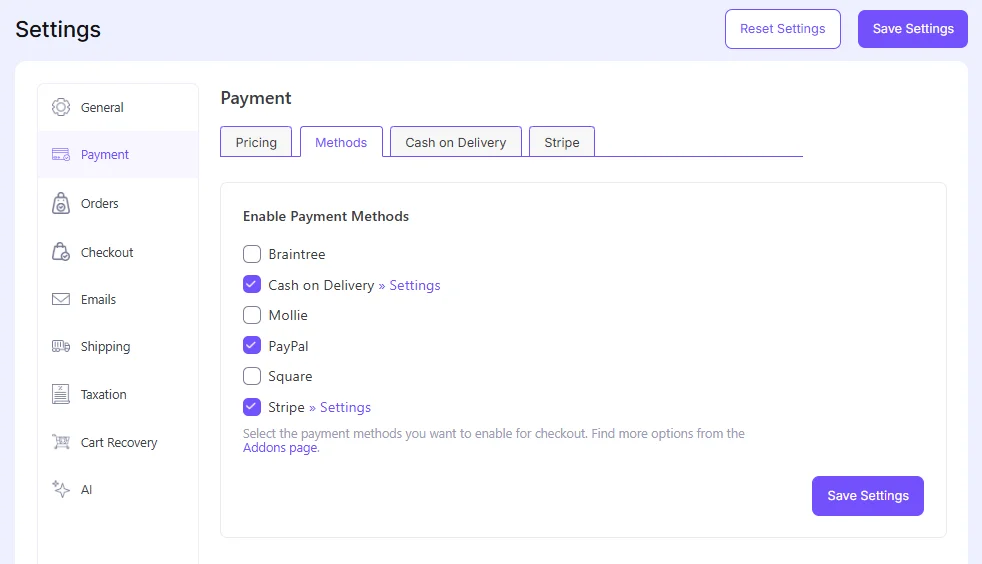
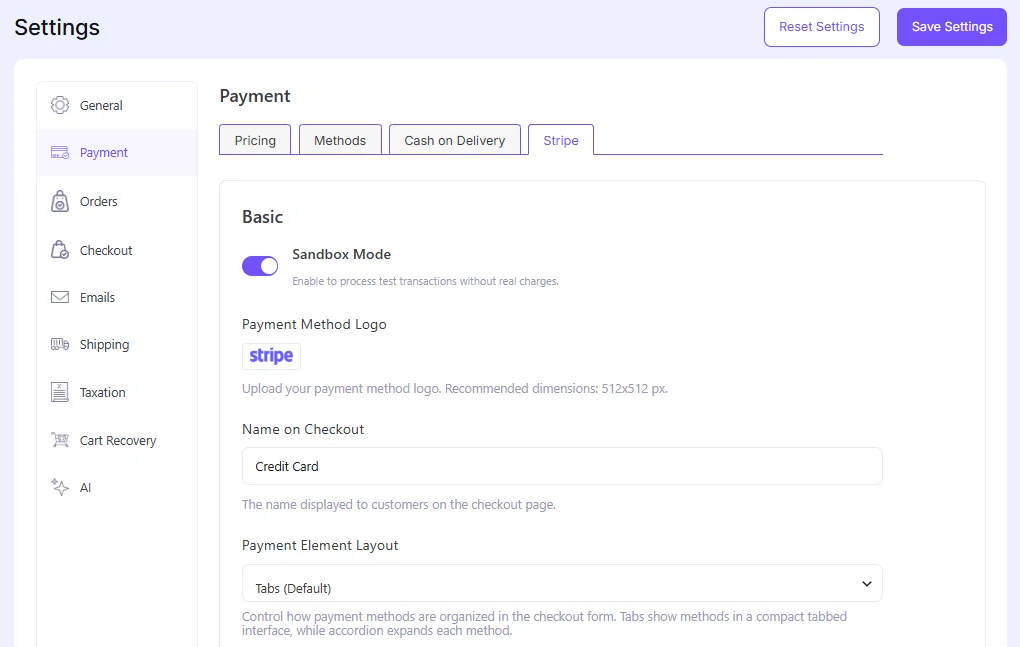
2. Open the new Stripe tab and turn on Sandbox Mode. Always build in sandbox first.
3. Paste your Sandbox Publishable Key and Sandbox Secret Key from the Stripe dashboard (test mode).
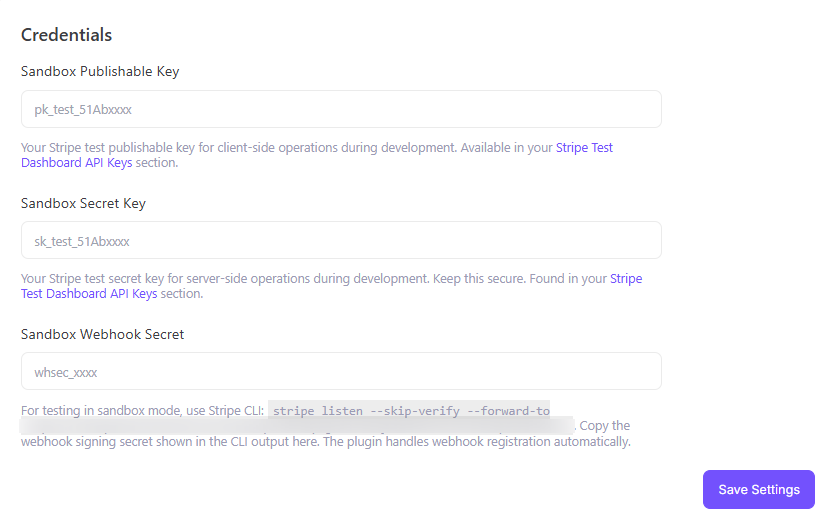
Save, then check that the Sandbox Webhook Secret field is filled in. Don’t skip the webhook. Renewals happen in the background, and your store only learns the result because Stripe sends it a message.
Note: EasyCommerce registers the webhook for you. Stripe needs a public HTTPS address, so registration fails on local sites. Use a tunnel such as ngrok, or a public staging domain.
Step 3: Turn on a subscription for a product
In EasyCommerce, the subscription is a setting inside the product’s Pricing card. For several plans (say monthly and yearly), add attributes first, then use variation prices from Auto generate variations to create a price for each plan and set the subscription on each one.
1. Go to Products > Add Product and add a name, summary and image. (The built-in AI Copy Writer can draft the description.)
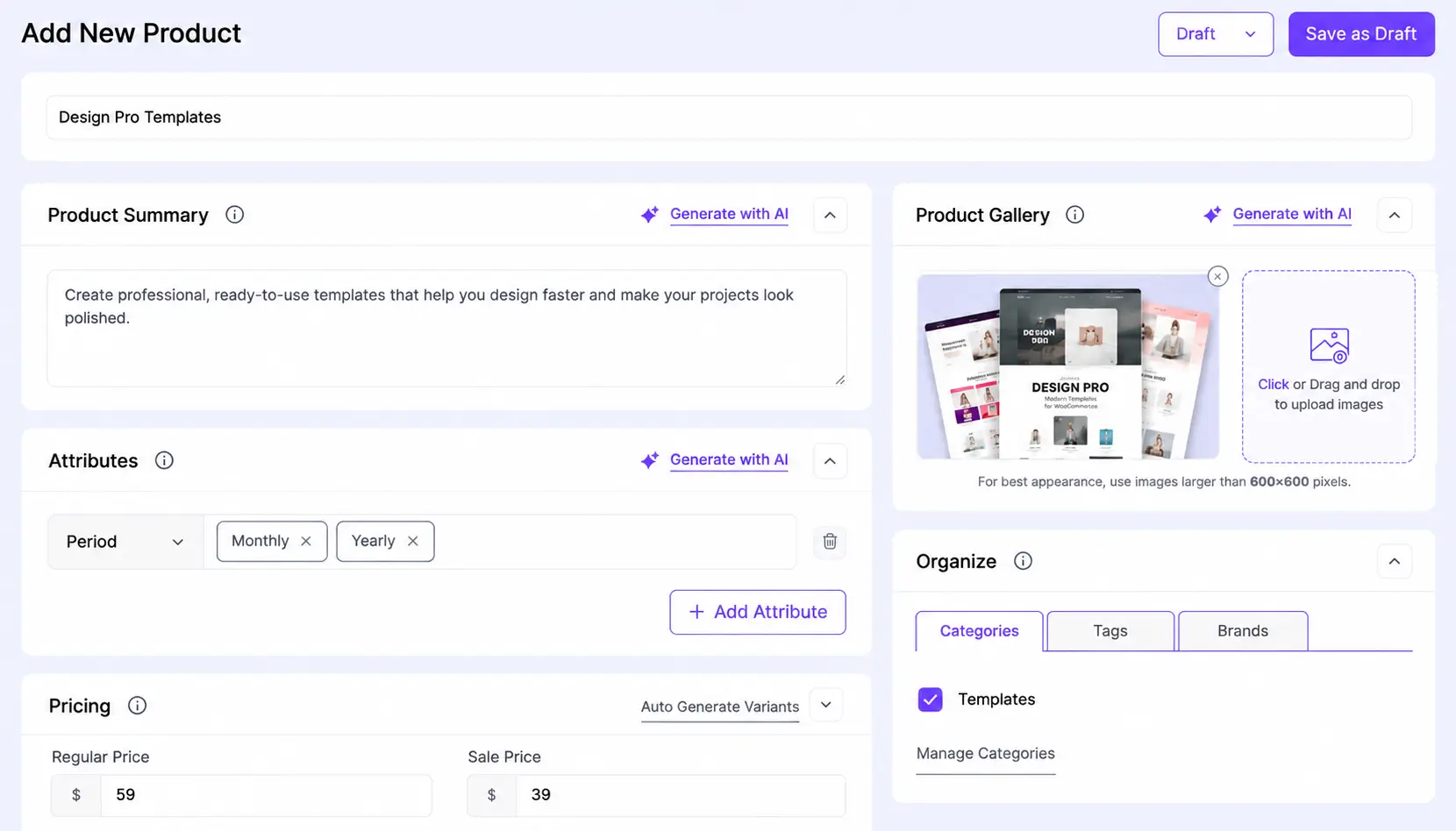
2. In the Pricing card, choose Digital Product or Physical Product and enter the Regular Price.
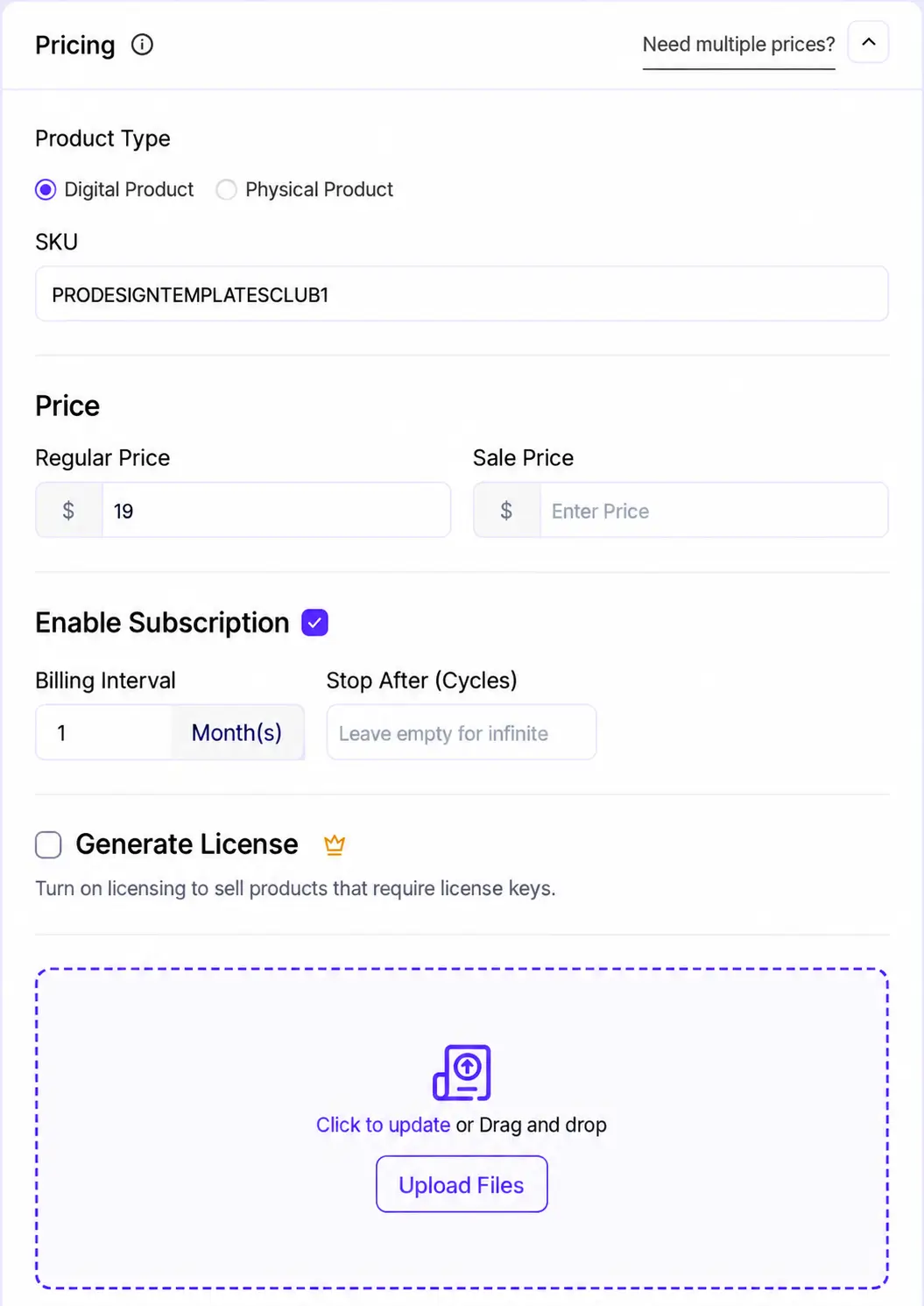
3. Tick Enable Subscription.
4. Set the Billing Interval: a number and a unit (Day(s), Week(s), Month(s) or Year(s)). For a quarterly plan, enter 3 months.
5. Optionally set Stop After (Cycles). Leave it empty for a plan that never ends, or enter a number for a fixed term, such as a 6-month payment plan.
6. Keep your first plan simple: one price, one interval.
Step 4: Set up renewal discounts and subscription emails
The settings live under EasyCommerce > Settings > Subscriptions, in four sections
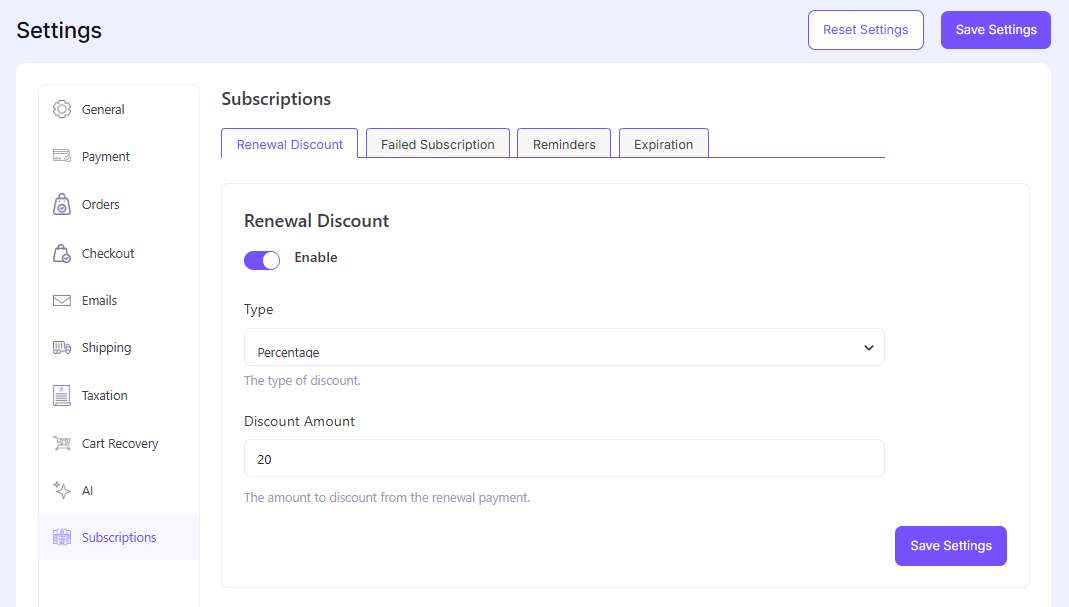
(i) Renewal Discount: an optional percentage or fixed discount on every renewal. The amount field is pre-filled with 20, but the toggle is off until you enable it. The first payment stays at full price.
(ii) Failed Subscription: one email to the customer and one to you when a renewal payment fails.
(iii) Reminders: up to four emails before a renewal, each sent a set number of days ahead (default 10).
(iv) Expiration: an email after a subscription expires, 10 days after by default.
Edit each template in your brand’s voice. Email marketing for ecommerce basics apply: one subject line, one action per email. And say plainly at checkout how often customers are billed and how to cancel. The compliance section below explains why.
Step 5: Test the full cycle, including a failed renewal
The first payment is the easy part. Real money is lost on renewals, so test those.
Use Stripe’s sandbox with any future expiry date (such as 12/34) and any three-digit CVC. Stripe’s testing documentation lists the cards:
| Scenario | Test card | Where it fails |
| Successful payment | 4242 4242 4242 4242 | Does not fail |
| Generic decline | 4000 0000 0000 0002 | At checkout |
| Insufficient funds | 4000 0000 0000 9995 | At checkout |
| Saves fine, fails when charged later | 4000 0000 0000 0341 | At the next charge |
The last card is the one that matters. Stripe’s Billing testing guide documents 4000 0000 0000 0341 as the way to test a failed payment on an active subscription: it attaches successfully, then declines when charged.
This workflow tends to save a week of guessing:
1. Create a sandbox-only test product with a 1-day billing interval.
2. Buy it with the 4242 card and confirm it shows Active under EasyCommerce > Subscriptions.
3. Before the renewal date, open that customer in your Stripe sandbox dashboard and swap their default payment method for the 0341 card. (Buying with 0341 directly would likely fail the first charge.)
4. After the renewal attempt, expect the failure webhook, the On Hold status and the two failure emails. Stripe notes an invoice can take about an hour to move from draft to open before collection, so check back the next day.
5. On a successful plan, check the next payment date, then cancel from a test customer account and confirm the status changes. Delete the daily test product before going live.
When it all behaves, switch Sandbox Mode off and add your live keys and live webhook.
Step 6: Let customers manage their own subscription
A self-service dashboard saves support tickets. Logged-in customers get a Subscriptions tab listing each plan with its status and next payment date. Opening one lets a customer:
- Renew: pay the next period early. On Stripe, this charges the saved card straight away, and the next automatic charge moves out from the original due date, so paying early never costs them time.
- Cancel: immediately or at the end of the current period.
One honest limit: customers cannot pause. A subscription goes On Hold when a renewal payment fails, or when you set it that way as an admin.
Step 7: Watch your numbers in the Subscriptions report
Open Reports > Subscriptions. Four cards show Active, New and Cancelled subscriptions and MRR (monthly recurring revenue), each compared with the previous period. Below are a trend chart, a status breakdown, an Expiring Soon list and a Recently Cancelled list.
MRR is normalised to a month, so weekly and yearly plans add together fairly, and it includes your renewal discount. In our demo store, 6 active subscriptions at $19 showed $114 MRR (6 x $19), with on-hold, cancelled and expired plans left out. Check Expiring Soon weekly: those are customers you can still win back.
Which Subscription Pricing Model Should You Choose?
The best model is the one customers understand in five seconds. For most new stores, that means one flat plan with an optional annual price, then tiers later.
Each common model maps onto EasyCommerce: a flat plan is one price, tiers are one price each, an annual option is a yearly price, a fixed term uses Stop After (Cycles), and loyalty pricing uses the renewal discount.
My Opinion
Don’t launch with three tiers. A new store has no data on which tier people want, so extra choices just slow the decision. Launch one plan and add tiers when requests repeat.
The renewal discount is the underused lever. It rewards staying: full price today, less on every renewal. But at 20% off, a $20 plan renews at $16, so every renewal gives up $4. Run the numbers before switching it on.
Free trials, setup fees and customer plan changes are not in the add-on today. If you need them, see the comparison below.
How Do You Reduce Failed Payments and Churn?
Churn is the share of subscribers you lose each month. Voluntary churn is a customer choosing to cancel. Involuntary churn is a payment failing without anyone choosing. Involuntary churn is the one you can fix with settings.
Voluntary vs involuntary churn
Recurly’s July 2026 benchmarks put ecommerce churn at 4.25% a month: 2.87% voluntary and 1.38% involuntary. That second number is revenue lost to expired cards and bank declines.
Take 500 subscribers at $20 a month. At 1.38%, about seven people (roughly $140 a month) vanish without choosing to cancel.
How retries work with Stripe
Stripe’s Smart Retries uses machine learning to pick retry times, with a recommended default of 8 tries within 2 weeks. You set the schedule in your Stripe dashboard. The limit: a hard decline (a stolen card, a wrong number) can’t succeed until the customer adds a new payment method.
What EasyCommerce does when a payment fails
When Stripe reports a failed renewal, EasyCommerce puts the subscription On Hold and emails the customer and you. If a later attempt succeeds, the plan returns to Active. Stripe does the retrying; EasyCommerce does the communicating. Use that split:
- Rewrite the failure email to ask for one action: update the card.
- Turn on at least one reminder before renewal. An expiring card is easier to fix before the charge fails.
- Check your On Hold tab weekly, and treat it like abandoned cart recovery: follow up fast, with one clear next step.
Do You Need Customer Consent and Easy Cancellation?
Yes. In the US, selling a subscription online means disclosing the terms before taking payment, getting clear consent, and giving customers a simple way to stop the charges. This is not legal advice, so check your own jurisdiction.
What changed in 2025, and what did not
The FTC’s Click-to-Cancel rule was struck down: the Eighth Circuit vacated it on July 8, 2025, because of procedural failures in the rulemaking process. However, that doesn’t mean subscription businesses can make cancellation difficult.
The Restore Online Shoppers’ Confidence Act (ROSCA) still applies, and the FTC continues to enforce it. Online sellers using recurring billing must clearly disclose material terms before collecting billing information, obtain express informed consent before charging customers, and provide a simple way to stop recurring charges.
The FTC reopened its Negative Option Rule rulemaking process in March 2026. However, no replacement Click-to-Cancel rule has been finalised.
State laws matter too. California’s amended Automatic Renewal Law, effective July 1, 2025, requires express affirmative consent, accessible cancellation through the enrollment communication method or the customer’s usual communication method, and annual reminders identifying the subscription, billing frequency, amount, and cancellation instructions.
Additional advance-notice requirements apply to certain annual renewals, extended trials, and price changes.
A practical checklist for your store
| What the rules expect | How to cover it in EasyCommerce |
| Disclose price, frequency and any end date before payment | State them in the product summary and near the buy button. The product page already shows the cycle (“$19.00 / month”) |
| Express consent | Add a line by the buy button: “You will be charged $19 every month until you cancel.” |
| Cancel the way they signed up | Customers cancel online from their account, immediately or at period end |
| Reminder before renewal | Turn on Reminders in the Subscriptions settings. For yearly plans, it doubles as the annual notice |
| Records | Keep the order and subscription records EasyCommerce stores |
Note: Never make cancelling harder than signing up.
How Does EasyCommerce Compare with Other WordPress Subscription Plugins?
EasyCommerce suits stores that want one lightweight plugin with simple recurring billing on Stripe. WooCommerce Subscriptions and SureCart offer more today, such as free trials and setup fees. Details below are as published on each vendor’s page in October 2026:
| Features | EasyCommerce Subscriptions | WooCommerce Subscriptions | SureCart |
|---|---|---|---|
| Price | Pro license from $199/year (pricing); core plugin free | $279/year, on top of WooCommerce | Free plan with a 2.9% fee; Pro from $199/year, no fee |
| Recurring gateways | Stripe | 25+ (Stripe, PayPal, WooPayments and more) | Check SureCart’s site |
| Free trials | No | Yes | Yes |
| Setup fee | No | Yes | Yes |
| Customer plan changes | No | Yes, with proration options | Check SureCart’s site |
| Pause | Admin On Hold; customers cannot pause | Customers can suspend or cancel | Not listed |
| Separate store plugin needed | No, it is the store plugin | Yes, WooCommerce | No |
- EasyCommerce fits a fast, standalone store where subscriptions are one feature among many (digital and physical products, AI product tools, abandoned cart recovery) and a monthly or yearly Stripe plan is enough. It also fits if you are weighing selling on WordPress without WooCommerce.
- WooCommerce Subscriptions fits if you need trials, sign-up fees, proration or a gateway other than Stripe, and you are happy running WooCommerce.
- SureCart fits if you want trials and setup fees with no upfront license and can live with the 2.9% free-plan fee.
What Does It Cost to Sell Subscriptions on WordPress?
Your costs are the plugin, the payment processor and hosting. The processor is the one that scales with revenue.
The core EasyCommerce plugin is free, and the Subscriptions add-on needs a Pro license (from $199/year). Stripe charges 2.9% + 30¢ per successful card transaction, plus 0.7% of volume for Stripe Billing on pay-as-you-go, and an extra 1.5% on international cards.
Fees vary by country. Watch the fixed 30¢. On a $20 monthly plan, card fees are 88¢ per charge, or 4.4%. Sell the same plan as a $200 yearly plan and one charge costs $6.10, about 3.05%. (Stripe Billing’s 0.7% comes on top either way.) That gap is the real case for an annual option.
Final Words: Make Subscription Selling Easy
To sell subscriptions with WordPress, you need three things: a plugin that handles recurring billing, a gateway that supports it, and a plan for failed payments. Start with one flat plan, test the renewal in sandbox, state your terms clearly, and fix involuntary churn first. It is the part you control.
Ready to set up your first plan? Install the free EasyCommerce plugin, add the Subscriptions, and run the daily-plan test from Step 5 before taking a single live payment.
Frequently Asked Questions
Not fully. The core EasyCommerce plugin is free, but recurring billing is part of the Pro add-on, which needs a paid license. You will also pay your processor's fees.
No. WooCommerce needs its own paid Subscriptions extension, while EasyCommerce is a standalone plugin. See EasyCommerce vs WooCommerce for the wider comparison.
Customers can cancel immediately or at the end of the current period, and renew early, all from their account. They cannot pause. To offer a break today, let customers cancel at period end and resubscribe later.
Not yet. The Subscriptions add-on (v1.3) has no free trial, setup fee or customer upgrades and downgrades. Today you can offer a discounted renewal, a fixed number of billing cycles and separate prices per plan. Check the EasyCommerce Subscriptions page for updates.