


 Support
 Docs
Docs Roadmap
 Changelog
Lifetime Deal ending soon - only 200 copies left
Claim LTD →Agentic Commerce
AI that chats, searches, and completes full purchases.
Admin AI assistant to manage your store by chat.
Free in-dashboard AI help, always available.
Fast and accurate product search results.
Let customer shop faster with voice search.
Sell on Messenger and WhatsApp with the same AI agent.
Connect Claude, Cursor, and any MCP client to your store.
Increase upsell with suggestions that connects.
Generative AI
Generate instant product descriptions.
Create high-res. images from simple prompts.
Build store/product templates in seconds.
Transform existing product photos with AI editing.
Auto-create product options from product name.
Ecommerce Features

Create and control your entire product catalog seamlessly.

Offer sizes, colors, and options with flexible variations.

Sell and auto-deliver downloadable files instantly.

Receive, track, and fulfill orders quickly and accurately.

Manage customer profiles, history, and details in one place.

Quick, clean, and hassle-free checkout experience.

Offer your customers diverse and secure payment options.

Automate the logistics with accurate shipping classes.

Simplify tax collection and compliance without the stress.

Recover lost sales with automated cart reminders.

Create and manage discount coupons that inspire sales.
Build trust with star ratings and verified reviews.

All your business data together for smarter decisions.

Engage customers with impactful email campaigns.
Give shoppers a personal account and order area.
Keep your store and customer data safe and protected.
Build in Test mode, then flip your store Live in one click.
Builder & Customization

The EasyCommerce Klaviyo Integration Addon helps you connect your store data with Klaviyo so you can run smarter, more automated ecommerce email marketing campaigns. When a customer places an order, their email is added directly to your Klaviyo audience.
This creates a smooth link between your store activity and your marketing workflows without any manual work.

After activating the addon and connecting your Klaviyo account through a Private API Key, EasyCommerce starts sending customer order emails directly to your Klaviyo account.
Every time a new buyer gets onboarded, their email address is added to your Klaviyo list instantly, giving you a fresh, accurate audience to work with. This keeps your contact list clean and helps Klaviyo trigger the right flows based on real purchase activity.
This addon only acts as a bridge between your EasyCommerce store and your Klaviyo account, sending data automatically in the background. All other features—like email design, automation, segmentation, and reporting - are fully handled by Klaviyo itself.
However, internal trigger-based emails, like order statuses, are customizable within the EasyCommerce Email Settings.
Below is the list of things you can do using Klaviyo-
Klaviyo lets you design and automate email sequences for new customers, repeat buyers, and inactive users. You can set up welcome emails, order follow-ups, product recommendations, and re-engagement flows - all triggered by real store events.
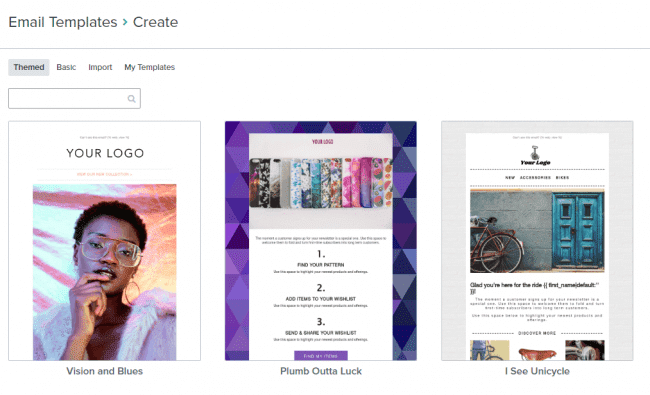
Klaviyo’s drag-and-drop editor helps you build professional emails without coding. Insert product information, dynamic customer data, and branded sections to maintain consistent communication across your store. You can use their templates as well.
Create targeted groups using customer behavior, purchase history, and engagement patterns. This helps you deliver more relevant messages that feel personal and drive better results.
Track open rates, clicks, conversion value, and customer lifetime metrics directly from Klaviyo. The integration ensures the data coming from EasyCommerce aligns perfectly with your campaign reports.
Only new customers who place an order are added to your Klaviyo list. This keeps your audience clean, avoids duplicates, and ensures your email costs stay manageable.
The addon connects through your Klaviyo Private API Key. EasyCommerce handles the communication safely in the background, keeping your marketing data in sync without exposing sensitive details.
Enable the Klaviyo Integration from the EasyCommerce Addons screen (WordPress Dashboard → EasyCommerce → Addons).
Inside Klaviyo, go to Account Settings → API Keys and create a new Private API Key with full access.
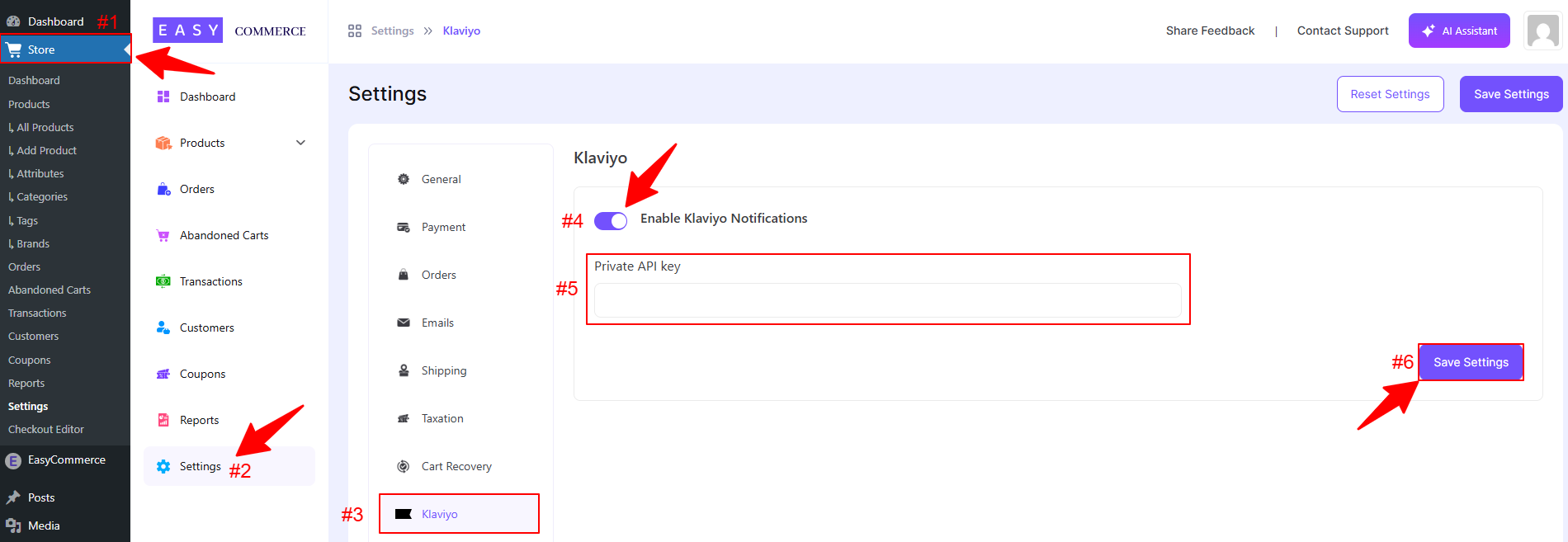
Enter the API key into Store → Settings → Klaviyo, toggle the integration on, and save your settings.
Place a test order to confirm that the customer's email appears in your Klaviyo profile list.
The integration helps you manage your email marketing more effectively, but the features you can use will depend on your Klaviyo plan. EasyCommerce ensures smooth syncing, but any platform-specific issues in Klaviyo fall under their support.
For more guidance, explore the full documentation with screenshots.