


 Support
 Docs
Docs Roadmap
 Changelog
Lifetime Deal ending soon - only 200 copies left
Claim LTD →Agentic Commerce
AI that chats, searches, and completes full purchases.
Admin AI assistant to manage your store by chat.
Free in-dashboard AI help, always available.
Fast and accurate product search results.
Let customer shop faster with voice search.
Sell on Messenger and WhatsApp with the same AI agent.
Connect Claude, Cursor, and any MCP client to your store.
Increase upsell with suggestions that connects.
Generative AI
Generate instant product descriptions.
Create high-res. images from simple prompts.
Build store/product templates in seconds.
Transform existing product photos with AI editing.
Auto-create product options from product name.
Ecommerce Features

Create and control your entire product catalog seamlessly.

Offer sizes, colors, and options with flexible variations.

Sell and auto-deliver downloadable files instantly.

Receive, track, and fulfill orders quickly and accurately.

Manage customer profiles, history, and details in one place.

Quick, clean, and hassle-free checkout experience.

Offer your customers diverse and secure payment options.

Automate the logistics with accurate shipping classes.

Simplify tax collection and compliance without the stress.

Recover lost sales with automated cart reminders.

Create and manage discount coupons that inspire sales.
Build trust with star ratings and verified reviews.

All your business data together for smarter decisions.

Engage customers with impactful email campaigns.
Give shoppers a personal account and order area.
Keep your store and customer data safe and protected.
Build in Test mode, then flip your store Live in one click.
Builder & Customization
The EasyCommerce Messenger Addon connects your Facebook Business Page directly to the EasyCommerce AI shopping assistant. When a customer sends a direct message to your Page, the very same AI agent that powers your storefront chat reads the message, searches your catalog, checks stock, and helps the customer place an order, all inside the Messenger conversation they already use every day.
Instead of asking shoppers to visit your website first, you meet them where they already are. There is no second bot to build, no duplicate product data to maintain, and no separate billing. Incoming messages flow into your store over a secure, signed webhook, and the assistant replies through Facebook's Graph API within seconds.
Turn your Facebook Page into a sales channel. Customers chat in plain language and move from product discovery to a completed order without ever leaving Messenger.
The agent that runs in Messenger is the same AI shopping assistant that runs on your storefront. There is no second bot to train or configure, and the experience stays consistent wherever the customer starts.
Every customer is given a dedicated session tied to their Messenger ID. Conversation history is preserved across messages, so the assistant remembers context within a customer's chat and picks up right where it left off.
Every incoming webhook is verified with an HMAC-SHA256 signature using your Facebook App Secret. Requests that fail the signature check are rejected before any processing happens, and the verification handshake protects your endpoint at setup time.
Messenger replies draw from the same AI credit pool as the rest of EasyCommerce. Each customer message costs 2 credits, with no separate plan or message cap to manage. You simply pay for what you use.
Facebook occasionally resends the same message. The addon automatically deduplicates repeated webhook events, and it skips delivery receipts and echo events, so customers never receive a doubled-up reply and credits are not wasted.
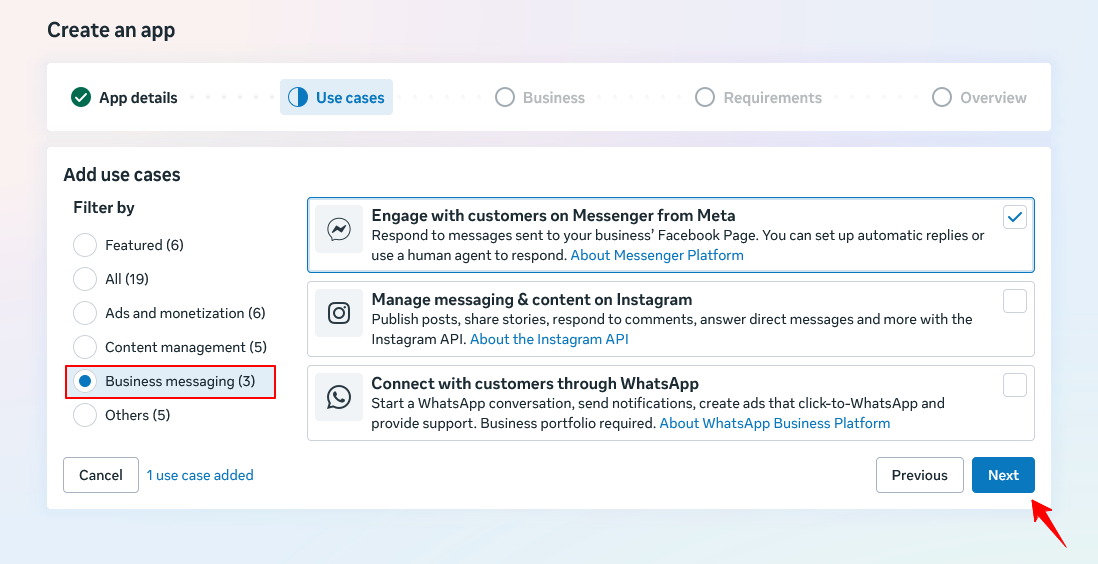
Step 1 - Create a Facebook App
Sign in to developers.facebook.com, create a new app, and choose the "Engage with customers on Messenger from Meta" use case to enable Messenger integration.
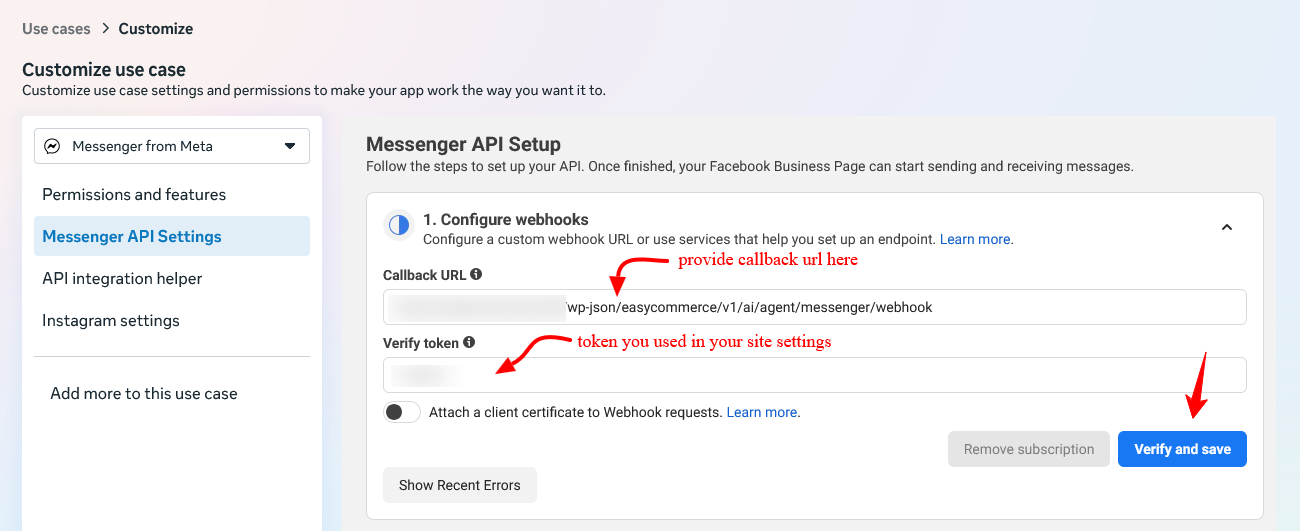
Step 2 - Configure the webhook
In the Facebook App's Messenger API Settings, add your store's callback URL (/wp-json/easycommerce/v1/ai/agent/messenger/webhook) and a verify token of your choosing.
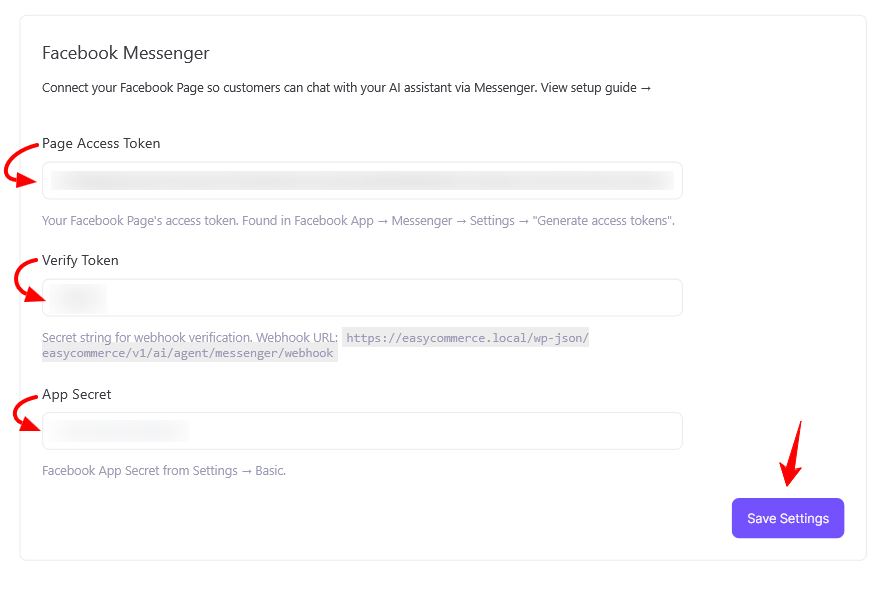
Step 3 - Save your credentials in EasyCommerce
Go to EasyCommerce → Settings → AI → Agentic AI → Facebook Messenger. Enter your Page Access Token, the matching Verify Token, and your App Secret, then save.
Step 4 - Verify and subscribe
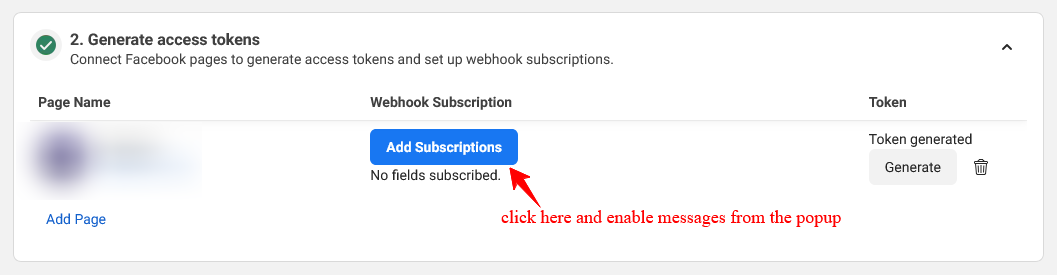
Return to Facebook, click Verify and Save to complete the handshake, then click the add a subscription button for your Page with the "messages" field enabled. Send a test message to confirm the assistant replies.
Note: This addon requires the EasyCommerce plugin to be installed and active, along with available AI credits. You will also need a Facebook Business Page and a Facebook App configured with a Page Access Token, Verify Token, and App Secret. Your site must be served over HTTPS and be publicly reachable.
Connect your Facebook Page today and let your AI assistant sell for you right inside Messenger, where your customers already are.