


 Support
 Docs
Docs Roadmap
 Changelog
Lifetime Deal ending soon - only 200 copies left
Claim LTD →Agentic Commerce
AI that chats, searches, and completes full purchases.
Admin AI assistant to manage your store by chat.
Free in-dashboard AI help, always available.
Fast and accurate product search results.
Let customer shop faster with voice search.
Sell on Messenger and WhatsApp with the same AI agent.
Connect Claude, Cursor, and any MCP client to your store.
Increase upsell with suggestions that connects.
Generative AI
Generate instant product descriptions.
Create high-res. images from simple prompts.
Build store/product templates in seconds.
Transform existing product photos with AI editing.
Auto-create product options from product name.
Ecommerce Features

Create and control your entire product catalog seamlessly.

Offer sizes, colors, and options with flexible variations.

Sell and auto-deliver downloadable files instantly.

Receive, track, and fulfill orders quickly and accurately.

Manage customer profiles, history, and details in one place.

Quick, clean, and hassle-free checkout experience.

Offer your customers diverse and secure payment options.

Automate the logistics with accurate shipping classes.

Simplify tax collection and compliance without the stress.

Recover lost sales with automated cart reminders.

Create and manage discount coupons that inspire sales.
Build trust with star ratings and verified reviews.

All your business data together for smarter decisions.

Engage customers with impactful email campaigns.
Give shoppers a personal account and order area.
Keep your store and customer data safe and protected.
Build in Test mode, then flip your store Live in one click.
Builder & Customization
Bring Paystack, one of Africa's leading payment platforms, directly into your EasyCommerce store. This add-on lets your customers pay with the methods they already trust — credit and debit cards, bank transfer, USSD, and mobile money — through Paystack's secure, mobile-friendly checkout, without the friction of a clunky payment flow.
Built natively for EasyCommerce, the addon registers Paystack as a first-class payment method at checkout, initializes each transaction through the Paystack API, verifies every payment on your server before completing the order, and keeps your order statuses in sync automatically. Whether you are testing in sandbox mode or going live, the entire flow is wired up for you out of the box.
No complicated connection steps - just paste your Paystack API keys and start selling. The addon keeps your test and live credentials separate, hides your secret keys behind password fields, and lets you move between environments with a single Test Mode switch.
Choose how your customers pay. Send them to Paystack's secure hosted page, or keep them on your store with Paystack's inline payment popup. Either way, the experience is fast, mobile-ready, and fully branded to Paystack's trusted checkout.
Security is built into every step. The addon never trusts the browser or the webhook body alone — each payment is verified directly with Paystack, and the amount charged is matched against the order total before the order is ever marked as paid.
The addon exposes a dedicated, signature-verified webhook endpoint that listens for Paystack events, so your order statuses stay accurate even if a customer closes the browser before returning to your store.
Issue full or partial refunds straight from your EasyCommerce order screen. The addon talks to the Paystack Refund API, records the refund against the order, and writes it back into EasyCommerce so your totals always reconcile.
Try everything safely before you go live. A single toggle switches the gateway into test mode using your Paystack test keys, and the rest of the gateway bends to fit your store.
Note: This addon requires the EasyCommerce plugin to be installed and active, plus an active Paystack account with API keys.
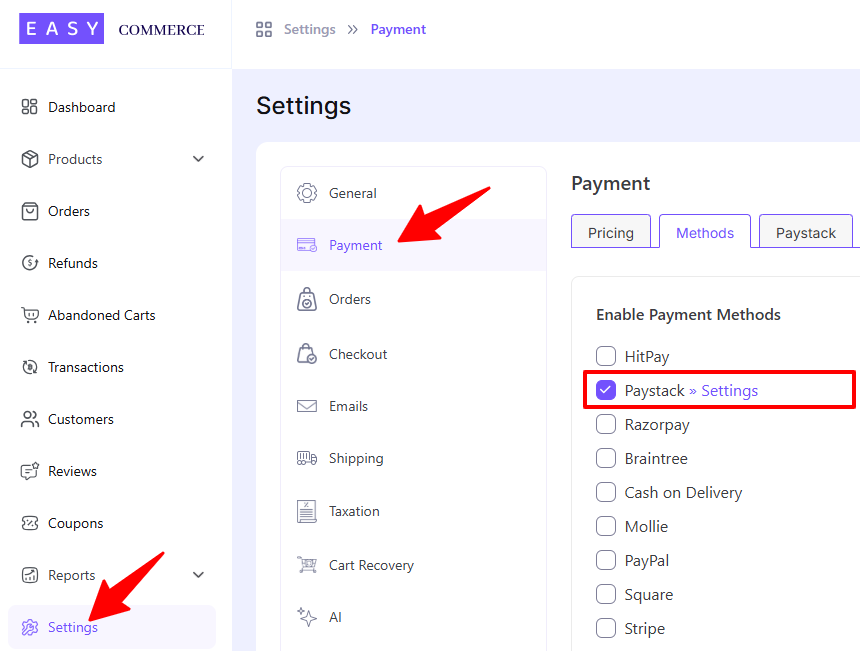
Step 1: Install the EasyCommerce Paystack add-on, activate it, and enable Paystack from your payment methods under EasyCommerce > Settings > Payment > Methods.
Step 2: Fill in the name, display image, and checkout settings [Redirect (hosted page) or Inline (popup)] — and confirm your store currency is one Paystack supports.
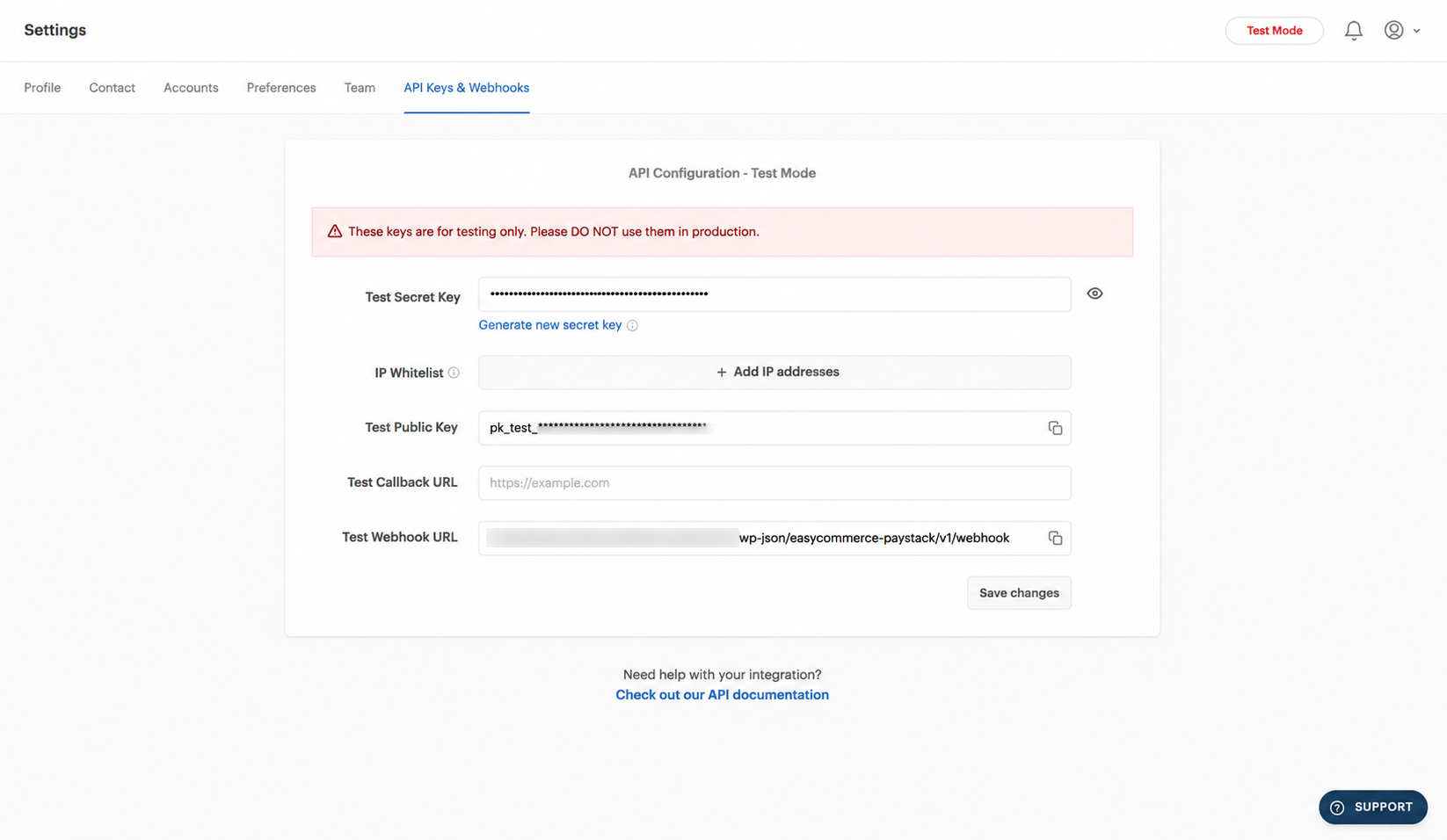
Step 3: Get your API keys from your Paystack Dashboard (Settings > API Keys & Webhooks).
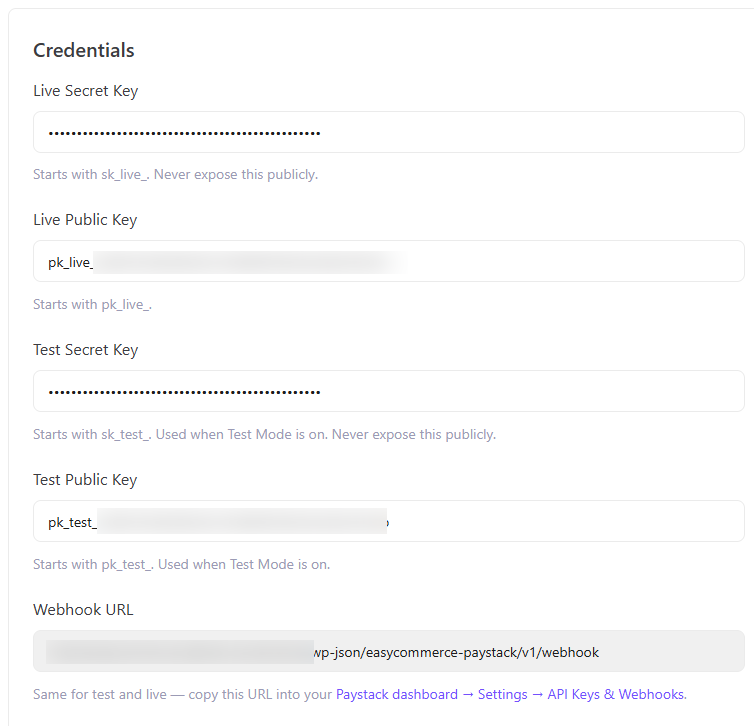
Step 4: Now paste your Secret Key and Public Key into the gateway settings. At the same time, copy the webhook URL from this settings page and paste in your Paystack Dashboard (Settings > API Keys & Webhooks) page.
This should do the work. Now start accepting card, bank transfer, USSD, and mobile money payments in minutes — add your Paystack keys and go live.