


 Support
 Docs
Docs Roadmap
 Changelog
Lifetime Deal ending soon - only 200 copies left
Claim LTD →Agentic Commerce
AI that chats, searches, and completes full purchases.
Admin AI assistant to manage your store by chat.
Free in-dashboard AI help, always available.
Fast and accurate product search results.
Let customer shop faster with voice search.
Sell on Messenger and WhatsApp with the same AI agent.
Connect Claude, Cursor, and any MCP client to your store.
Increase upsell with suggestions that connects.
Generative AI
Generate instant product descriptions.
Create high-res. images from simple prompts.
Build store/product templates in seconds.
Transform existing product photos with AI editing.
Auto-create product options from product name.
Ecommerce Features

Create and control your entire product catalog seamlessly.

Offer sizes, colors, and options with flexible variations.

Sell and auto-deliver downloadable files instantly.

Receive, track, and fulfill orders quickly and accurately.

Manage customer profiles, history, and details in one place.

Quick, clean, and hassle-free checkout experience.

Offer your customers diverse and secure payment options.

Automate the logistics with accurate shipping classes.

Simplify tax collection and compliance without the stress.

Recover lost sales with automated cart reminders.

Create and manage discount coupons that inspire sales.
Build trust with star ratings and verified reviews.

All your business data together for smarter decisions.

Engage customers with impactful email campaigns.
Give shoppers a personal account and order area.
Keep your store and customer data safe and protected.
Build in Test mode, then flip your store Live in one click.
Builder & Customization

Bring Razorpay, India's leading payment platform, directly into your EasyCommerce store. This addon lets your customers pay with the methods they already trust — credit and debit cards, UPI, net banking, and popular wallets — through Razorpay's secure, mobile-friendly checkout, without ever leaving your store.
Built natively for EasyCommerce, the addon registers Razorpay as a first-class payment method at checkout, handles order creation through the Razorpay Orders API, verifies every transaction, and keeps your order statuses in sync automatically. Whether you are testing in sandbox mode or going live, the entire flow is wired up for you out of the box.
Forget juggling raw API keys. The addon connects your Razorpay account using the secure OAuth 2.0 authorization flow — you click "Connect Account," approve access on Razorpay, and you are done. Access and refresh tokens are stored encrypted at rest and refreshed automatically in the background, so your connection stays live without manual intervention.
Customers complete payment through Razorpay's official checkout modal, loaded straight from Razorpay's servers. The modal opens right on your checkout page, pre-filled with the shopper's name, email, and phone, and supports the full range of Razorpay payment methods including cards, UPI, net banking, and wallets.
Security is built into every step. Each completed payment is validated with an HMAC-SHA256 signature check before the order is marked successful, so payments cannot be spoofed or tampered with. Orders that fail verification are flagged automatically.
The addon exposes a dedicated, signature-verified webhook endpoint that listens for Razorpay events and keeps your store perfectly in sync - even for payments confirmed after the shopper closes their browser. Captured payments, failed payments, and confirmed refunds are reflected on the order along with detailed order notes.
Issue full or partial refunds straight from your EasyCommerce order screen. The addon talks to the Razorpay Refunds API on your behalf, records the refund reference on the order, and confirms it via webhook, no need to log in to the Razorpay dashboard.
Try everything safely before you go live. A single toggle switches the gateway into test mode using your Razorpay test credentials. You can also choose the default status for new Razorpay orders and personalize how the gateway appears to shoppers with a custom payment-method name and logo.
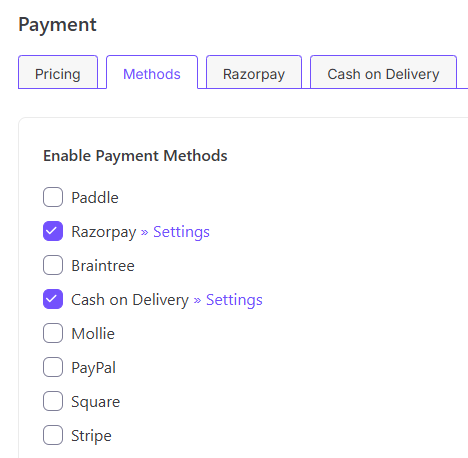
Step 1: Install and enable. Install the EasyCommerce Razorpay addon, activate it, and enable Razorpay from your EasyCommerce payment settings.
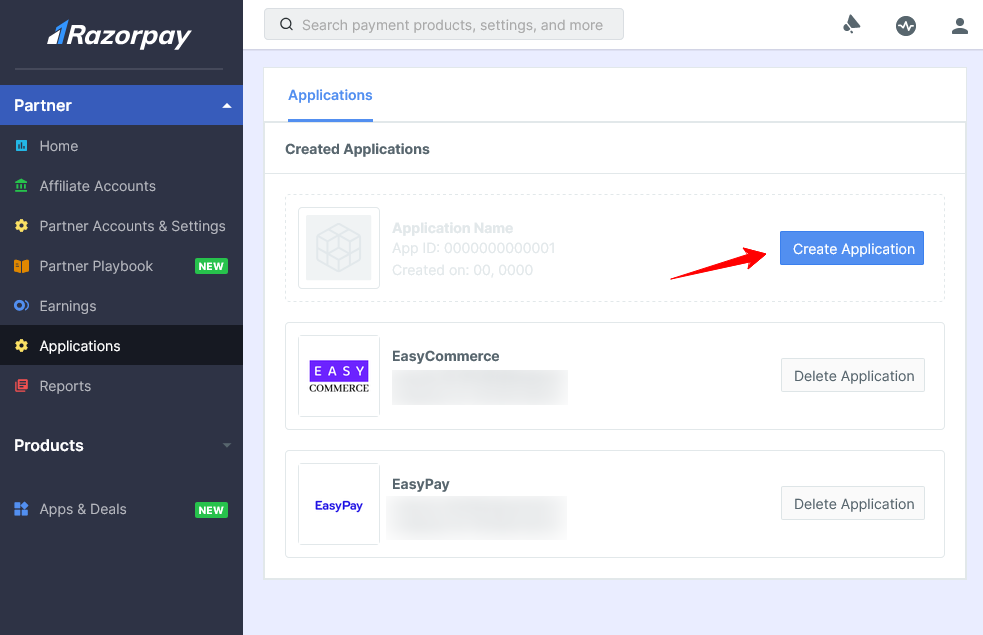
Step 2: Create an OAuth app in your Razorpay Dashboard
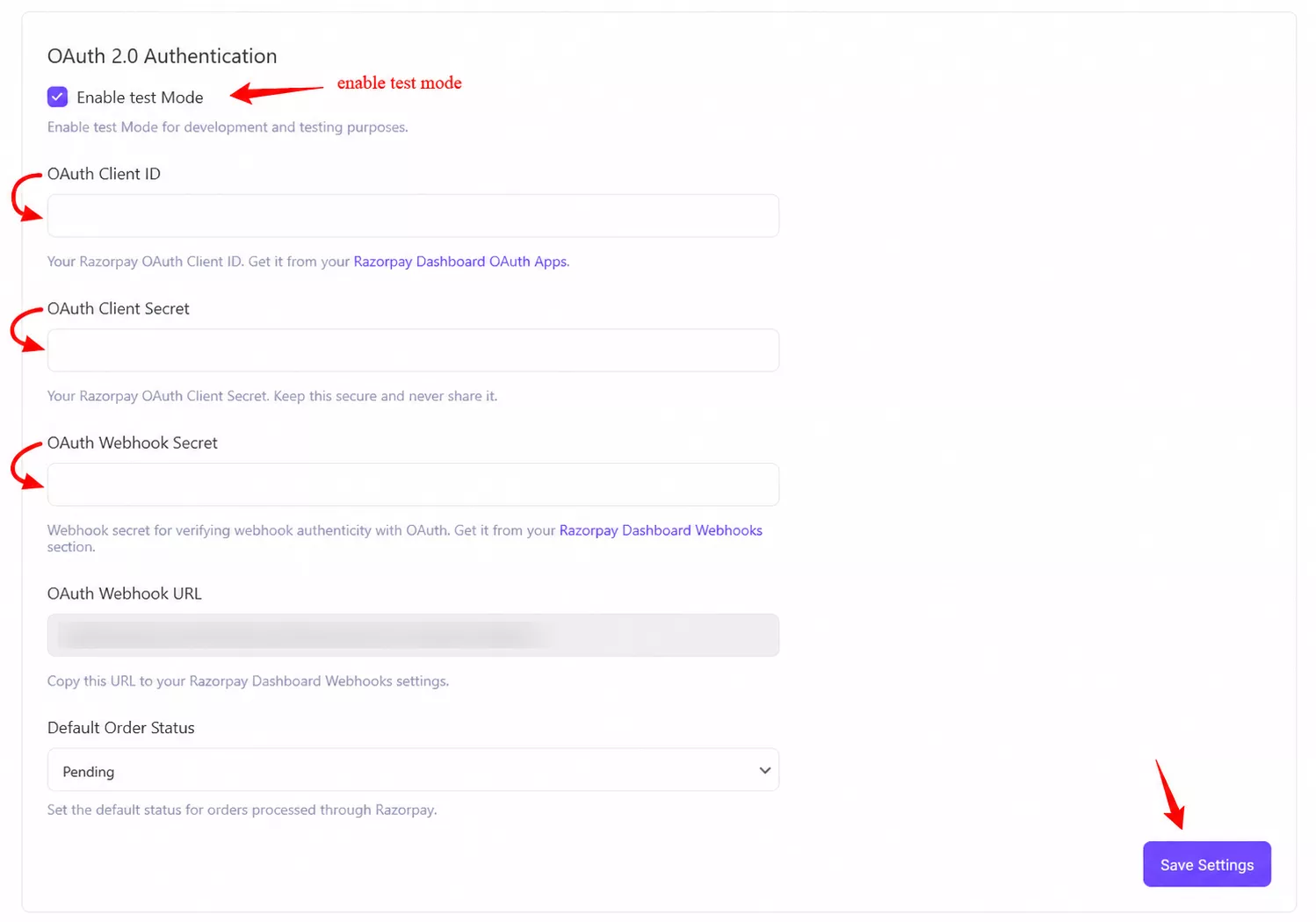
Then paste your OAuth Client ID and Client Secret into the gateway settings. Optionally enable Test Mode while you set things up.
Step 3: Now you need to connect your account.
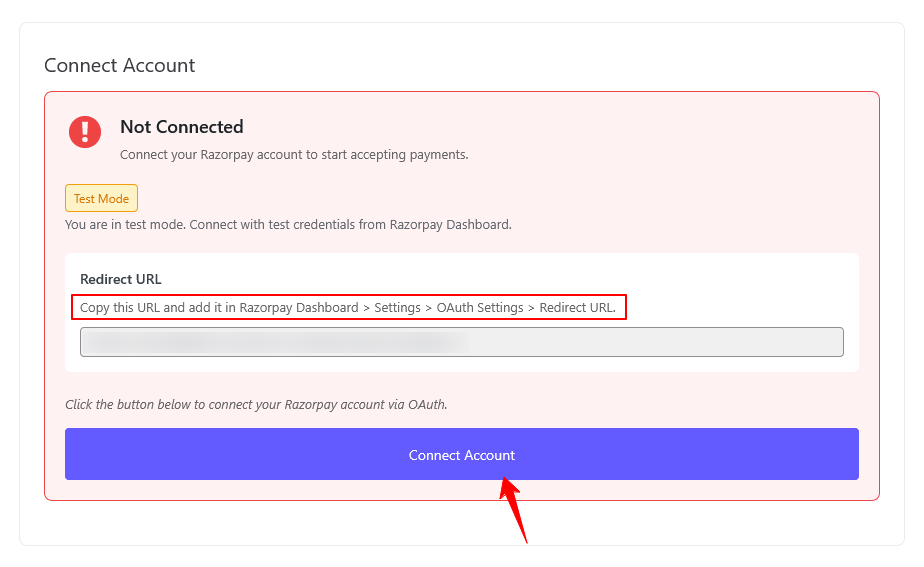
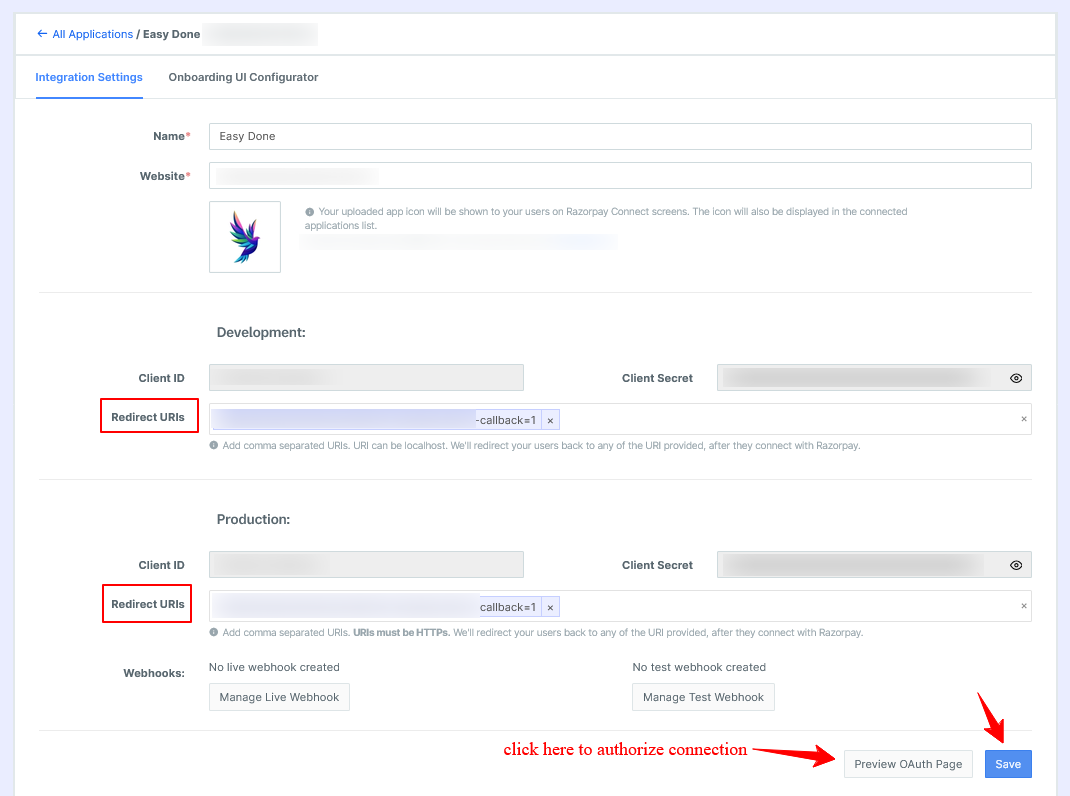
Add the displayed Redirect URL to your Razorpay OAuth app, then click Save. After that, click the Preview OAuth Page and authorize the connection in a single secure step.
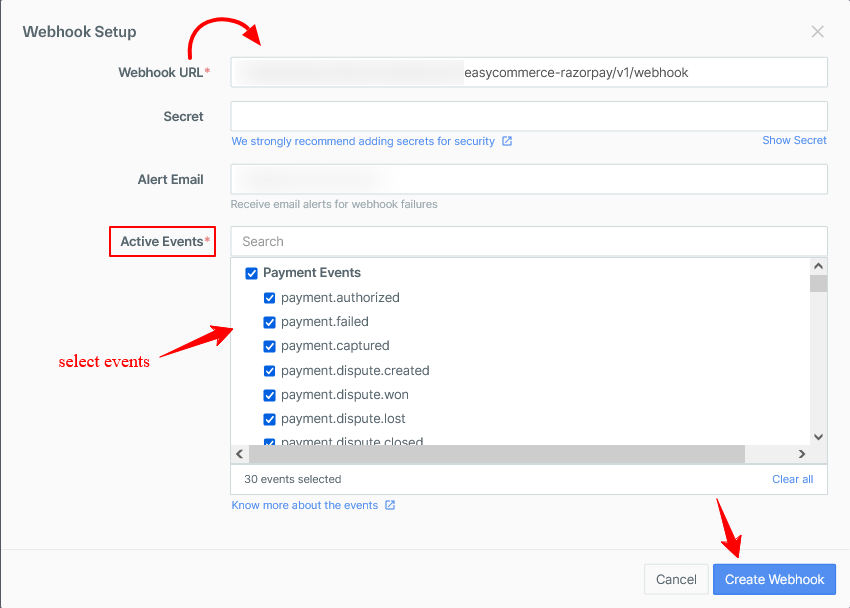
Step 4: Copy the webhook URL shown in the settings into your Razorpay Dashboard Webhooks section so payment, failure, and refund events flow back to your store in real time.
Note: This addon requires the EasyCommerce plugin to be installed and active, plus an active Razorpay account with OAuth app credentials.
Start accepting cards, UPI, net banking, and wallet payments in minutes, connect your Razorpay account today and give your customers the checkout experience they expect.