


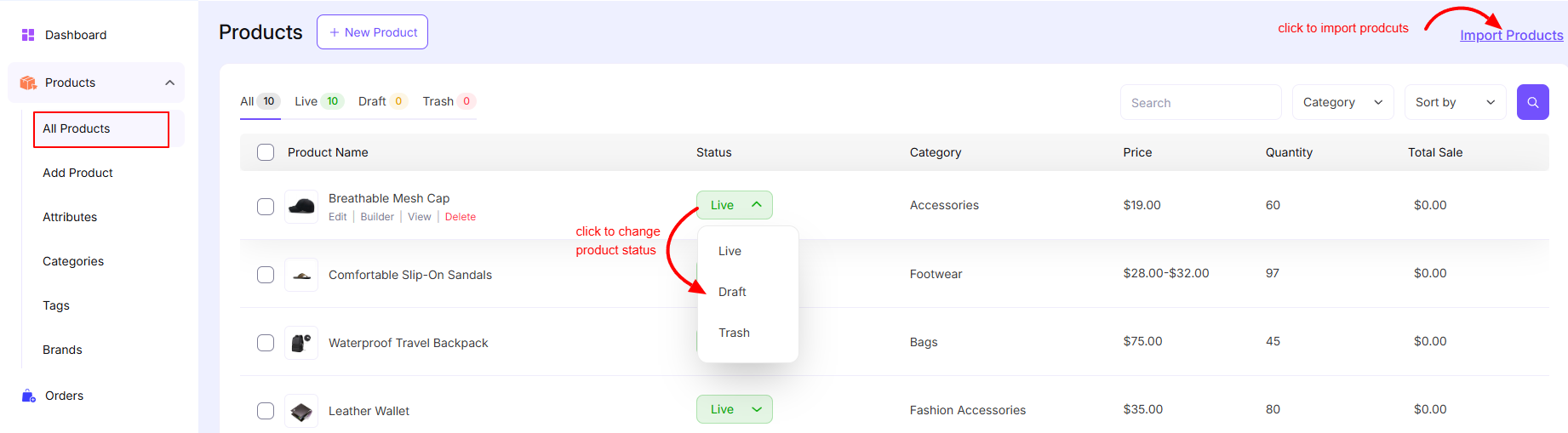
The All Products page in the EasyCommerce plugin allows you to manage all your store products in one place. From here, you can create, edit, organize, and control the status of your products efficiently.
Accessing Products
Navigate to:
EasyCommerce → Products → All Products
Page Layout
1. Top Actions
- New Product
Click to create a new product. - Import Products
Upload products in bulk using a CSV or supported format.
2. Product Filters
At the top of the product list, you will find status-based filters:
- All – Displays all products
- Live – Published and visible products
- Draft – Unpublished products
- Trash – Deleted products
Each tab shows the number of products in that category.
3. Search, Category & Sorting
- Search Bar – Quickly find products by name
- Category Filter – Filter products by category
- Sort By – Sort products based on different criteria (e.g., date, price)
Product List Table
Each product is displayed in a table with the following columns:
Product Name
- Shows product title and thumbnail
- Quick actions:
- Edit – Modify product details
- Builder – Open product builder
- View – Preview product page
- Delete – Move product to trash
Status
Displays current product status:
- Live
- Draft
- Trash
You can change the status directly from the dropdown.
Category
Shows the assigned category of the product (e.g., Accessories, Footwear, Bags).
Price
Displays the product price:
- Fixed price (e.g., $19.00)
- Variable range (e.g., $28.00 – $32.00)
Quantity
Indicates available stock for each product.
Total Sale
Displays total sales generated by the product.
Bulk Actions
- Select multiple products using checkboxes
- Perform bulk operations (e.g., delete, update status)
Product Status Management
Live
- Product is published
- Visible to customers
Draft
- Product is saved but not visible on the frontend
Trash
- Product is removed from active listings
- Can be restored or permanently deleted
Best Practices
- Keep product names clear and descriptive
- Assign proper categories for better organization
- Regularly update stock and pricing
- Use Draft mode before publishing new products
The All Products section in EasyCommerce provides a centralized interface to manage your entire product catalog by making it easy to control visibility, pricing, stock and organization.
Was this doc helpful?