


The Brands feature in EasyCommerce allows you to organize products by manufacturer, label or identity. It helps customers easily browse products based on brand preference and improves product filtering and discovery.
Overview
Brands act as a taxonomy similar to categories and tags. You can assign a brand to each product, making it easier to group and display related products together.
This is especially useful for stores that sell items from multiple manufacturers or product lines.
Accessing Brands
To manage brands:
Dashboard → Products → Brands
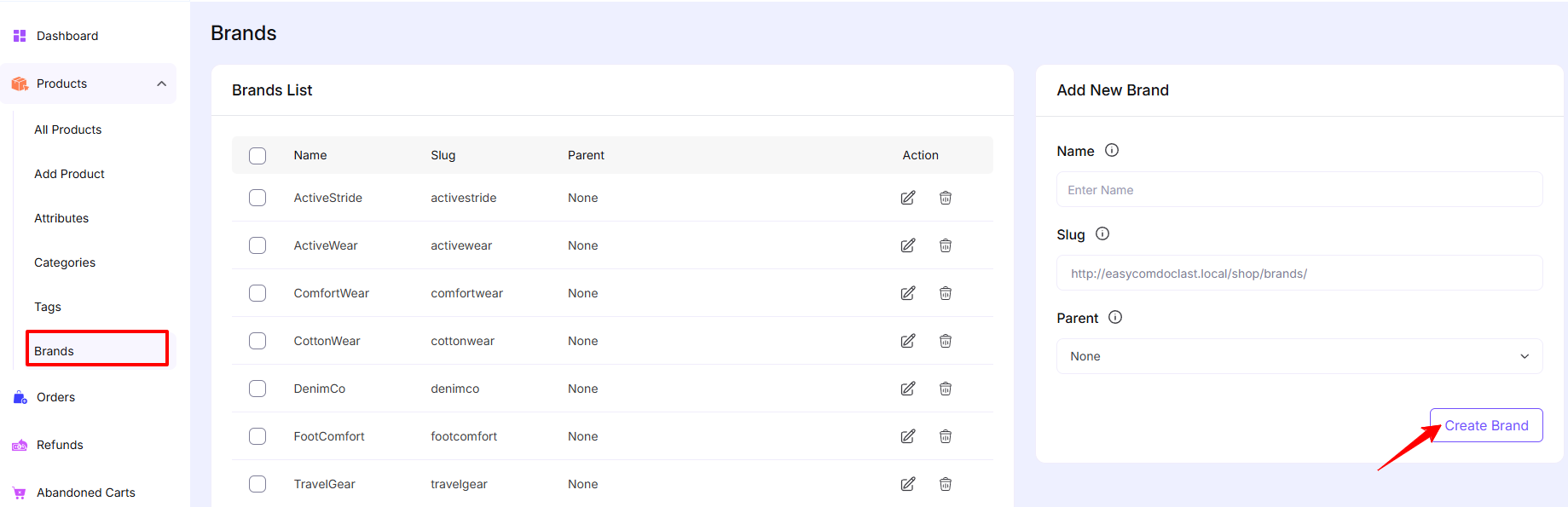
Here you will find:
- Brands list (existing brands)
- Add new brand panel
Brands List
The Brands List displays all created brands with the following details:
- Name – The brand name displayed on the store
- Slug – URL-friendly version of the brand name
- Parent – Used to create hierarchical brand structure
- Actions – Edit or delete a brand
Add New Brand
You can create a new brand from the right panel.
Fields:
1. Name
Enter the brand name (e.g., Nike, Adidas, Apple).
2. Slug
- Automatically generated from the name
- Used in the URL (e.g.,
/shop/brands/nike) - Can be customized if needed
3. Parent
- Optional
- Assign a parent brand to create a hierarchy
- Useful for sub-brands or collections
Click the Create Brands button to add brand to your store.
Editing & Deleting Brands
- Click the Edit icon to update brand details
- Click the Delete icon to remove a brand
Note: Deleting a brand will not delete associated products but the brand will be removed from them.
Was this doc helpful?