


The Attributes feature in EasyCommerce allows you to define product characteristics such as size, color or any custom property. These attributes can be used to create product variations or provide additional product details.
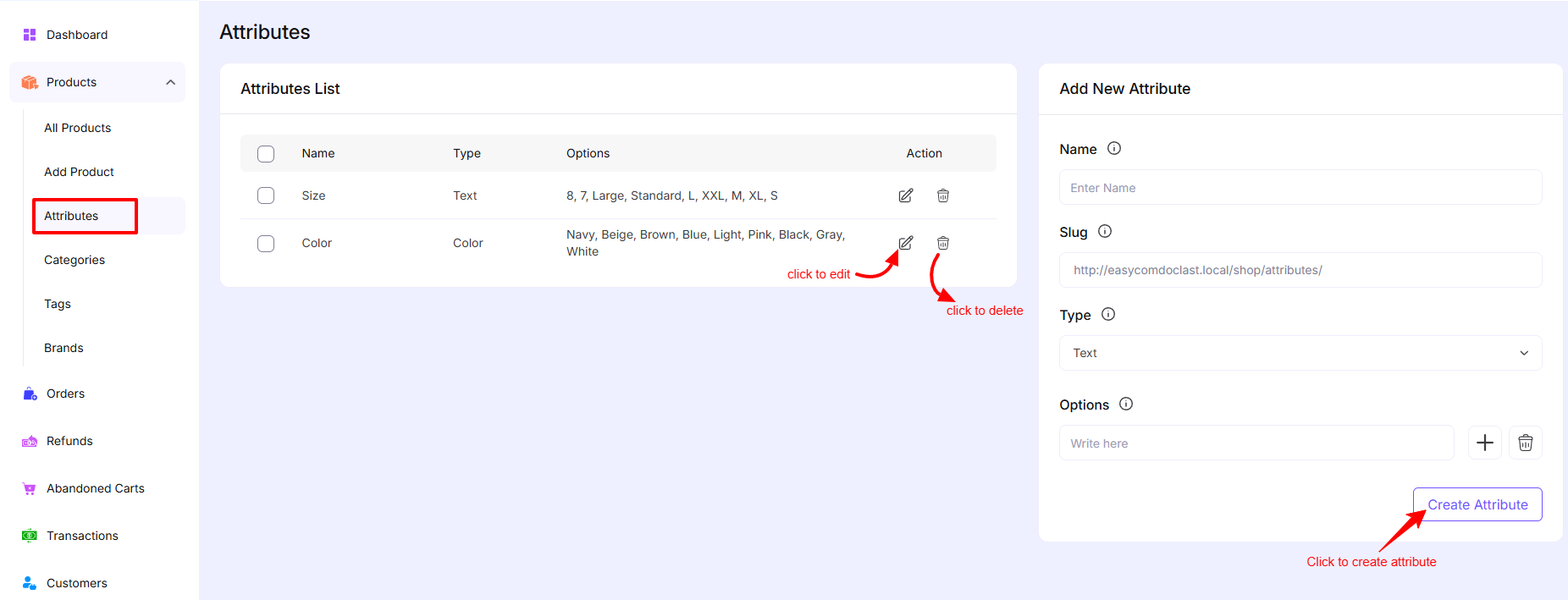
Accessing Attributes
To manage attributes:
- Go to Dashboard → Products → Attributes
Attributes List
The Attributes List displays all created attributes.
Columns Overview:
- Name – The attribute name (e.g., Size, Color)
- Type – The attribute type (e.g., Text, Color)
- Options – Available values for the attribute (e.g., S, M, L or Red, Blue)
- Action – Edit or delete the attribute
Actions:
- Edit – Click the edit icon to modify the attribute
- Delete – Click the delete icon to remove the attribute
Add New Attribute
You can create a new attribute using the panel on the right side.
Fields Explanation:
- Name
Enter the attribute name (e.g., Size, Color) - Slug
A URL-friendly version of the name, usually auto-generated - Type
Select the attribute type:- Text – For general options like size (S, M, L)
- Color – For color-based attributes
- Options
Add attribute values (e.g., Red, Blue, Green or S, M, L)- Use the add button to include more options
- Use the remove button to delete an option
Create Attribute
After completing the required fields:
- Click the Create Attribute button to save the attribute
Edit Attribute
To update an existing attribute:
- Click the edit icon from the list
- Update the necessary fields
- Save your changes
Delete Attribute
To remove an attribute:
- Click the delete icon
- Confirm the deletion
Note: Deleting an attribute may affect products that are using it.
Was this doc helpful?