


The Refunds feature in EasyCommerce allows you to view and track all processed refund requests. It provides detailed information about refunded orders, customers, payment methods and transaction history.
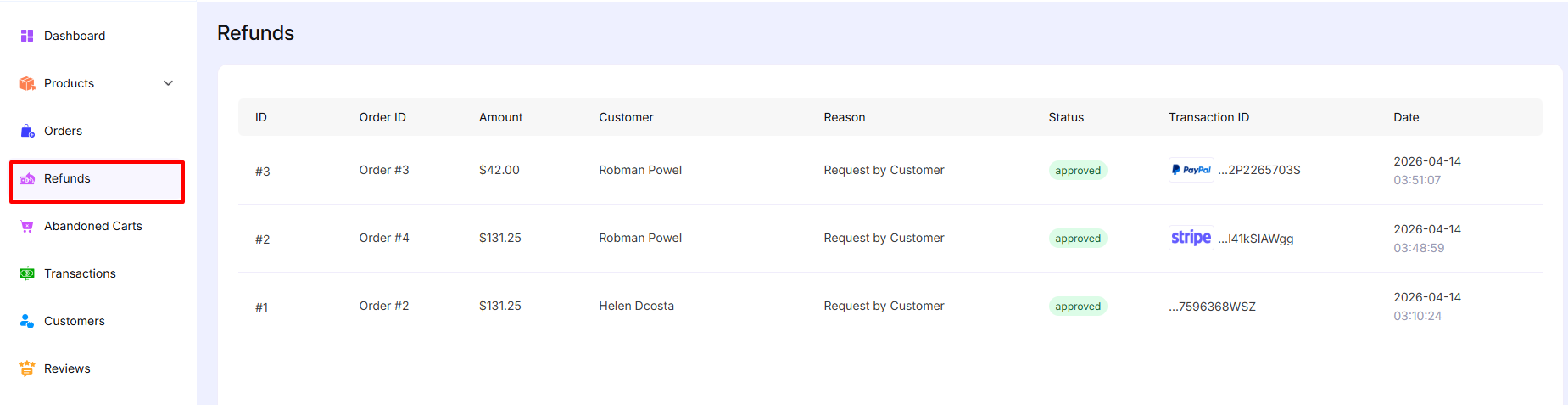
Accessing Refunds
To manage refunds:
Go to Dashboard → Refunds
Refunds List
The Refunds List displays all refund records in a structured table format.
Columns Overview:
ID – Unique identifier for each refund (e.g., #1, #2, #3)
Order ID – This order associated with the refund (e.g., Order #3)
Amount – Total refunded amount
Customer – Name of the customer who requested the refund
Reason – Reason for the refund (e.g., Request by Customer)
Status – Current status of the refund (e.g., Approved)
Transaction ID – Payment reference with gateway (e.g., PayPal, Stripe)
Date – Date and time when the refund was processed
Actions
Currently, the Refunds section is used for tracking and viewing refund records.
- Refunds shown here are already processed
- Status is displayed as Approved for completed refunds
- Payment gateway icons (e.g., PayPal, Stripe) indicate how the refund was made
Click the link to know more details about processing a refund
Was this doc helpful?