


Home » Transactions » Transactions
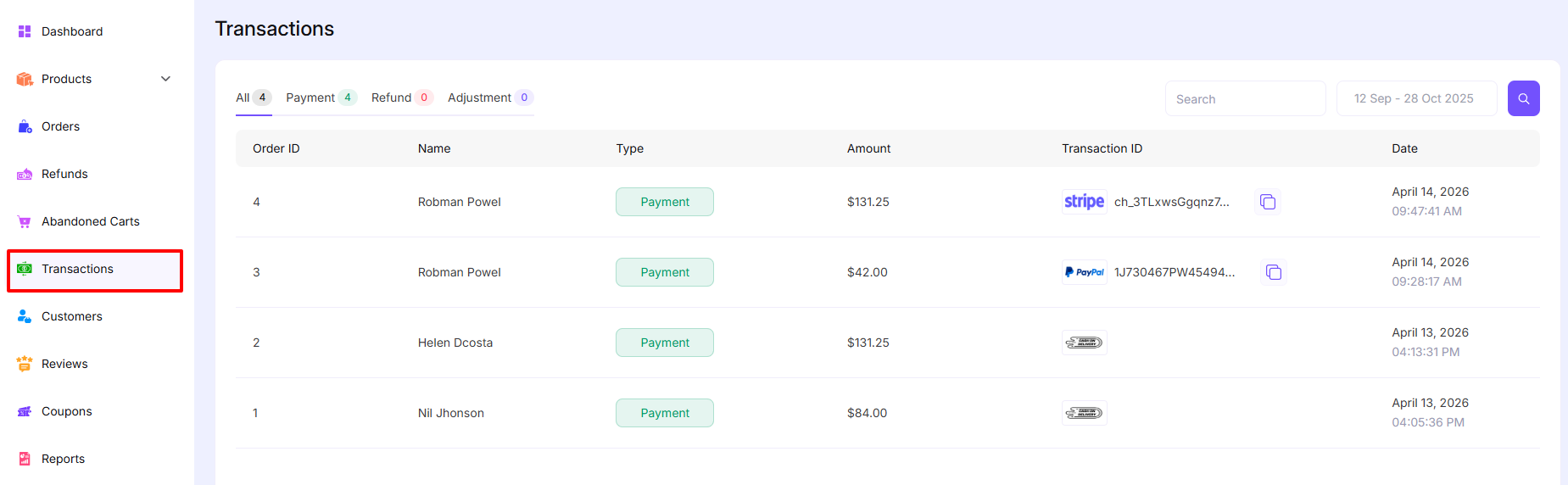
The Transactions section in EasyCommerce allows you to view and manage all financial activities related to your store, including payments, refunds and adjustments. This page provides a clear overview of every transaction made by customers.
How to Navigate
Go to:
Dashboard → Transactions
Overview of Transactions Page
The Transactions page displays a table containing all transaction records with useful details. At the top, you will find filters and search options to help you quickly locate specific transactions.
Transaction Filters
You can filter transactions using the following tabs:
- All – Displays all transaction types
- Payment – Shows only successful payments
- Refund – Displays refunded transactions
- Adjustment – Shows manual or system adjustments
Each tab also shows the total number of records for that category.
Search and Date Filter
- Search Bar: Allows you to search transactions by customer name or transaction ID
- Date Range Picker: Filter transactions within a specific date range
Transaction Table Columns
Each transaction entry includes the following information:
- Order ID
Unique identifier for the order associated with the transaction - Name
Customer name who made the transaction - Type
Indicates the transaction type (e.g., Payment, Refund, Adjustment) - Amount
Total amount involved in the transaction - Transaction ID
Payment gateway reference ID (e.g., Stripe, PayPal)- Includes a copy icon to quickly copy the ID
- Date
Date and time when the transaction was completed
Transaction Types Explained
- Payment
Represents a successful payment made by a customer - Refund
Indicates money returned to the customer - Adjustment
Manual or system-generated changes to transaction amounts
Was this doc helpful?